
Participant
March 30, 2023
Question

Network problems

  • March 30, 2023
  • 1 reply
  • 218 views

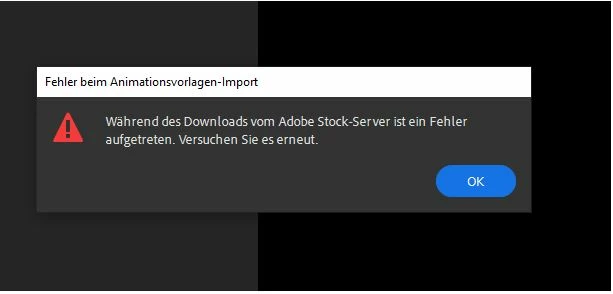
When trying to add certain animation templates to my project, I get an error message. This does not occur with all templates, but only with some.


We tracked it with IT and it seems to be related to the URL stock.adobe.com. However, accessing this URL works (no errors in firewall or proxy logs).


Do you guys have any idea why this error is happening with some templates?
This topic has been closed for replies.

1 reply

Myra Ferguson
Community Expert
Community Expert
March 30, 2023

There's a similar thread regarding the Essential Graphics (although it's in Premiere Pro as opposed to Premiere Rush) with some recommendations from Adobe Employees that might help:

Lemlem_Author
Participant
April 3, 2023

Hello @Myra Ferguson, Thank you very much for your comment.
This could be a possible explanation. I will have it tested by the relevant colleagues.


It is a pity that the error message is not a little more specific at this point and that the corresponding premium templates are marked incorrectly.

Myra Ferguson
Community Expert
Community Expert
April 3, 2023

From that post, it looks like there are Adobe Employees who were aware of the issue and fixed it. 


I'm not an Adobe employee (I'm only a fellow Rush user who volunteers to try to help others), so there's not much I can do about changing error messages. Sorry I couldn't be more help on that front.