
Exit
  • Global community
    • Language:
      • Deutsch
      • English
      • Español
      • Français
      • Português
  • 日本語コミュニティ
  • 한국 커뮤니티
0

After upgrade to FM 2015, cannot import .book files into RH

New Here ,
Aug 25, 2015 Aug 25, 2015

I have RoboHelp 11. I recently upgraded from FM 12 to FM 2015. After the upgrade I can not import FM books (12 or 2015) into RoboHelp. On import, I get the message "This operation cannot be completed without Framemaker. Install Framemaker and try again".

I've tried re-installing both FM 2015 and RH 11, but problem continues.
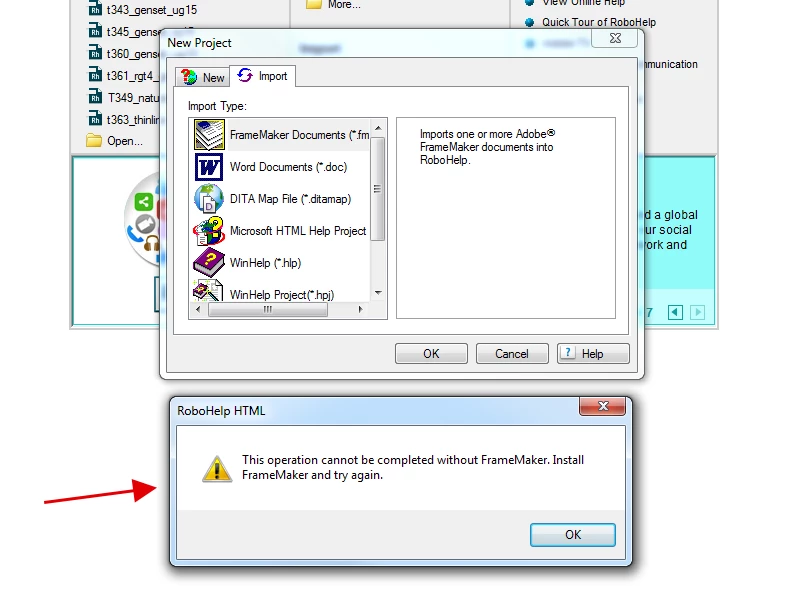
Robohelp-not-recognizing-framemaker2.png

955
Translate
Report
Community guidelines
Be kind and respectful, give credit to the original source of content, and search for duplicates before posting. Learn more
community guidelines
Community Expert ,
Aug 25, 2015 Aug 25, 2015

Were you running the 2 products separately or as part of the TCS?

Translate
Report
Community guidelines
Be kind and respectful, give credit to the original source of content, and search for duplicates before posting. Learn more
community guidelines
New Here ,
Aug 25, 2015 Aug 25, 2015

Separately.

Translate
Report
Community guidelines
Be kind and respectful, give credit to the original source of content, and search for duplicates before posting. Learn more
community guidelines
Community Expert ,
Aug 25, 2015 Aug 25, 2015

Do you still have FM12 installed?

Translate
Report
Community guidelines
Be kind and respectful, give credit to the original source of content, and search for duplicates before posting. Learn more
community guidelines
New Here ,
Aug 25, 2015 Aug 25, 2015

No. FM 12 was uninstalled.

Translate
Report
Community guidelines
Be kind and respectful, give credit to the original source of content, and search for duplicates before posting. Learn more
community guidelines
Adobe Employee ,
Aug 25, 2015 Aug 25, 2015
LATEST

Because of version incompatibility, RH11 can not start FM2015 itself.

If you don't have FM12 installed with RH11, you can link or update your FM book by manually starting FM2015 before these operations.

You will need to do this every-time you link or update an FM book or document in Robohelp 11.

Translate
Report
Community guidelines
Be kind and respectful, give credit to the original source of content, and search for duplicates before posting. Learn more
community guidelines
Participant ,
Aug 25, 2015 Aug 25, 2015

With respect to linking an FM project, it's been established that FM2015 and RH2015 don't need to be part of the Tech Comm Suite (TCS) package. However, for older versions of FM and RH, linking couldn't be done unless one had the TCS.

For importing an FM project, you could try installing demo of RH2015, just to confirm that there isn't some similar TCS requirement occuring in the background.

Translate
Report
Community guidelines
Be kind and respectful, give credit to the original source of content, and search for duplicates before posting. Learn more
community guidelines
Community Expert ,
Aug 25, 2015 Aug 25, 2015

My suspicion is version compatibility and maybe the order in which things were installed. I’d try it out on a non-production machine with both FM2015 & RH2015 and see if a copy of the FM content can be imported correctly.

Translate
Report
Community guidelines
Be kind and respectful, give credit to the original source of content, and search for duplicates before posting. Learn more
community guidelines
Adobe Employee ,
Aug 25, 2015 Aug 25, 2015

Jeff is right. RH11 will not be compatible with FM2015 as it is released later.

Translate
Report
Community guidelines
Be kind and respectful, give credit to the original source of content, and search for duplicates before posting. Learn more
community guidelines
Resources
RoboHelp Documentation
Download Adobe RoboHelp