
July 14, 2011
Answered

Associating Content to a Folder

  • July 14, 2011
  • 3 replies
  • 1901 views

RoboHelp 9.0.0.228/Server 9

WebHelp Pro

Single Project (upgraded from RH x5 to RH9)

Is it possible to attach content at the folder level?  I would like content (or a topic) to display when an end-user clicks on a folder from the Table of Contents.  The idea is to provide an introduction/explaination of the topics contained in that folder in greater detail than what is revealed by the folder's title.

Eva
    This topic has been closed for replies.
    Correct answer Captiv8r

    Hi Eva

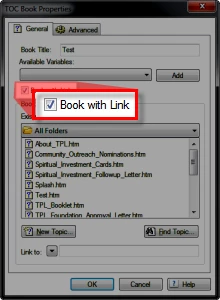
    Based on what you have stated it would seem you are maybe using Folders instead of Books and Pages in your Table of Contents? If so, you just right-click the Book in the TOC editor and choose to associate a topic to the book by clicking the check box.

    Cheers... Rick

    Helpful and Handy Links

    RoboHelp Wish Form/Bug Reporting Form

    Begin learning RoboHelp HTML 7, 8 or 9 within the day!

    Adobe Certified RoboHelp HTML Training

    SorcerStone Blog

    RoboHelp eBooks

    3 replies

    Inspiring
    July 15, 2011

    If you have a parent/child project, and your folder needs to link to a topic in a different child project, you need to hard code it to the published file. In other words, you have to right click that topic on the TOC in the published project to obtain and copy the url. Then paste it into your "Book with Link > Link To" field. At the present time there is no way to link to other projects within Robohelp.

    Captiv8r
    Legend
    July 15, 2011

    Hi Mareen

    I hate to be disagreeable here, but I have to disagree.

    I've accomplished a great many things with RoboHelp that others have claimed or though was impossible for the tool to achieve. You just have to have a good working knowledge of the technolgy and be willing to think creatively.

    There are a couple of different ways I can think of to achieve that behavior.

    First, as long as you know the ultimate relative pathing to the desired topic, it should accept it, no?

    Second, one could easily create a topic in the source project that has been configured to redirect to the appropriate topic in the child. Then link to that topic from the master TOC.

    Cheers... Rick

    Helpful and Handy Links

    RoboHelp Wish Form/Bug Reporting Form

    Begin learning RoboHelp HTML 7, 8 or 9 within the day!

    Adobe Certified RoboHelp HTML Training

    SorcerStone Blog

    RoboHelp eBooks

    Captiv8r
    Legend
    July 15, 2011

    This works between two child projects? The parent project is really just a shell. What is the specific META tag you use? Could you please provide an example of the code?


    Hello again

    Sure, I'd be happy to.

    <meta HTTP-EQUIV=refresh CONTENT="0;URL=First_Topic.htm">

    0 represents the delay in seconds before the page is redirected to the page  specified in URL=. For topic redirection, we usually want it to happen  immediately with no delay. If the desired page is Boffo.htm, replace  First_Topic.htm with Boffo.htm.

    Cheers... Rick

    Helpful and Handy Links

    RoboHelp Wish Form/Bug Reporting Form

    Begin learning RoboHelp HTML 7, 8 or 9 within the day!

    Adobe Certified RoboHelp HTML Training

    SorcerStone Blog

    RoboHelp eBooks

    Participating Frequently
    July 15, 2011

    HI Eva,

         Yes it is definitely possible to associate topics to Folder in the project manager after it comes as a book in TOC (by Auto create TOC or dragging the folders in the TOC pane).

    The process will be to keep such explaining topics out of the TOC and later in the books generated for Folders in TOC should be converted to "book with Link" as shown by RIck and then the links these books with the topics that explain them.

    Hope this will help
    Ashish

    Captiv8r
    Captiv8rCorrect answer
    Legend
    July 14, 2011

    Hi Eva

    Based on what you have stated it would seem you are maybe using Folders instead of Books and Pages in your Table of Contents? If so, you just right-click the Book in the TOC editor and choose to associate a topic to the book by clicking the check box.

    Cheers... Rick

    Helpful and Handy Links

    RoboHelp Wish Form/Bug Reporting Form

    Begin learning RoboHelp HTML 7, 8 or 9 within the day!

    Adobe Certified RoboHelp HTML Training

    SorcerStone Blog

    RoboHelp eBooks