
Known Participant
April 9, 2013
Answered

Auto-sizing pop-ups not sizing properly after converting RH9 project up to RH10. Any ideas?

  • April 9, 2013
  • 1 reply
  • 2113 views

We just upgraded to RH10 (the upgrade came with Adobe Technical Communications Suite 4 upgrade).  We successfully converted four projects that came over from RH9 to RH10.  I think my only issue is that all of my popups that were configured to open in the topic as "display in auto-sizing popup" are opening up as if they were in "page default" frame (see image map screen below):
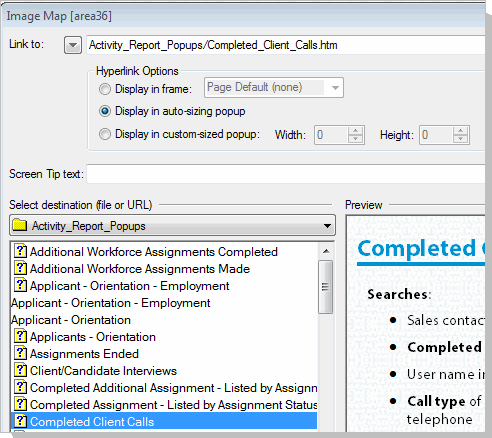
We are running IE9 browser and Windows 7 ops system.  These popups worked fine and sized themselves so that we could click off of them and go back to the main topic before we converted the project.  ANY IDEAS????

P.S. I have already tried removing the display in auto-sizing popup option, then saving the topic, then changing back and nothing happened.  I did not change my css or the master page that the popups were assigned and which worked before the conversion.

Thank you!!  I wonder if I will have to redo all of the image mapping to each of the popups in order to get auto-sizing popups to work.  Please advise.

Message was edited by: DNCopeland I discovered another employee who has already moved up to RH10 was able to open the same project and see the pop-ups which open as autosized for her, not as a page default of the entire window as they are for me.

This topic has been closed for replies.
Correct answer johndaigle

I just located and downloaded what appears to be a new RH 10.0.1 patch that specifically addresses my co-worker's issue with losing her links in Resource Manager.  She is an "administrator" of her desktop, whereas I am not, but I will alert you and Peter if this patch also addresses my inability to use "auto-sizing" of popups when generating new image maps or editing exiting ones. Thank you for this idea.


Sorry to barge in here, but I wanted to pass along my experience with this bug.

I found that autosizing (or custom for that matter) popups in image maps were working fine in Rh9 and broken in Rh10 in the Topic Previewer (eyeglasses icon) BUT NOT in the actual WebHelp output.

So, DHCopeland, are you reporting what you see in the Topic Previewer, or have you tried generating and viewing in the actual output? 

I'm still testing if there is any improvement after installing the Rh 10.0.1 patch. So far, it appears that the patch does not address this bug. I will try a different machine.

John Daigle

Adobe Certified RoboHelp and Captivate Instructor

Evergreen, Colorado

www.showmethedemo.com

1 reply

Peter Grainge
Community Expert
Community Expert
April 10, 2013

Not something I have seen reported.

What happens if you copy the version that is on your colleagues PC to yours?

Have you tried trashing the CPD file with the project closed?


See www.grainge.org for RoboHelp and Authoring tips

@petergrainge

Use the menu (bottom right) to mark the Best Answer or Highlight particularly useful replies. Found the answer elsewhere? Share it here.
Known Participant
April 10, 2013

I will try deleting the current CPD while the project is closed.  This does not sound like it will solve my issue since my co-worker when viewing the same project from RH10 does see the image - mapped popups in the correct autosizing frame. Neither of us touched the master page for our popups (only created to avoid having breadcrumbs show up on all topics) nor have we touched the default.css file. I think somehow I have a RH10 setting different from what my co-worker has on her new RH10 installation. (We all install our individual software to our desktops, but want to use our projects from a network).

I am updating a WebHelp output in RH9 which uses a lot of "image mapping" to link topics to an image (in these cases a report sample) using the "Display in autosizing popup" option.  Interestingly it works for several of us in RH HTML 9, viewing the same project (a backup version not converted to RH10).  We have discovered the other employee who has upgraded to Adobe Tech Comm Suite, sees the topics that are mapped to an image containing the report sample correctly!  Somehow I seem to be the issue.

I have a backup copy of the project on my local drive, which also ignores the autosizing of the popups that are mapped to an image inside a topic.  I have discovered I can generate a new "popup" from the Objects toolbar to display as an auto-sizing popup, but not when adding a new image mapping.  The popup displays, but as if it were in the Page Default (none) option seen in the Hyperlinks first choice, "Display in frame".  When I hover over the image mapping to see its properties, I receive the same javascriptBSSCPopup(topic location) that I get with the successful new popup. Those autosize, just not when in the image map.

Thanks for any other ideas. I am planning on trying to insert a new image mapping from my co-workers RH10 install and see if it also works for her, like the others that came over with the conversion from RH9 to RH10.

Message was edited by: DNCopeland I have tried deleting the CPD file for the local project copy, then reopening the project, forcing RH10 to generate a new CPD.  It is about 812KB, where before it was 1.2MB, but nothing changed in being able to get a popup to "autosize" itself when inside an image map.  My IT group will try to uninstall RH10 and reinstall RH10 in the next day or two since I know it works from another local workstation.  I also read all of the RH10 upgrades and features inside your site and am grateful for all of the other help it provided!!!!

Known Participant
April 16, 2013

Yes, Donna. Please do file that as a bug. I have been traveling and have not had the time I would like to pound on the patch. Adobe Engineering pays attention to the wish list and the more folks who make note of what they experience, the more quickly these things can be fixed.

Thanks for helping us!

John Daigle

Adobe Certified RoboHelp and Captivate Instructor

Evergreen, Colorado

www.showmethedemo.com


Ok, it helps to know it will help. Having this work now after a mere reinstall, but not the patch, indicates to me that it was my local issue. The project pop-ups from an image mapping displayed fine for the other employee. The third person who has just received the entire suite cannot even open his project, although he only uses links, (not hotspots or DHTML or expanding text, etc.) I told him to try having our IT group reinstall his software as it could not hurt.

Donna Copeland

Technical Writer - Franchise Systems

Express Employment Professionals | International Headquarters

8516 Northwest Expressway | Oklahoma City, Oklahoma 73162

405.840.5000 | ext. 4160