
November 13, 2014
Answered

Bizarre section URLs in Responsive Layout after upgrade to 11.0.3

  • November 13, 2014
  • 1 reply
  • 317 views

The following problem has hit my RoboHelp after upgrading v11 to the latest patch 3:

When I generate a Responsive HTML5 layout, section URLs get weirdly formatted in a browser (tried both Firefox and Chrome). This does not seem to be project-specific, because the same problem happens when I generate even the standard out-of-the-box projects like Salesbuilder2 and EmployeeCare2.

Here is what happens:

For example, a link to:

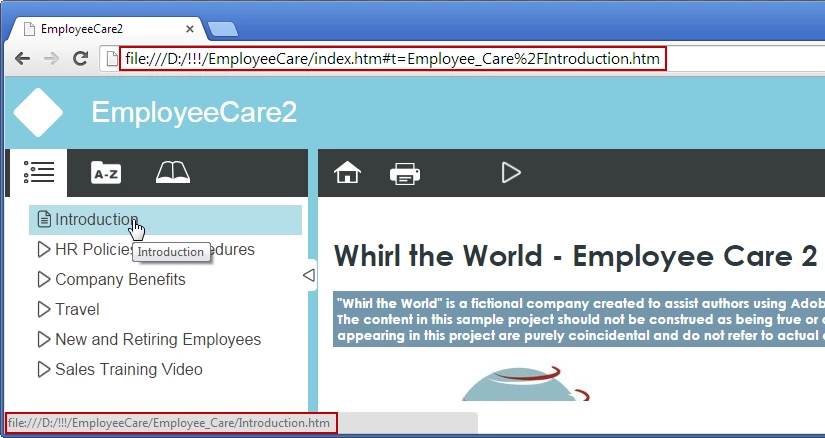
file:///D:/!!!/EmployeeCare/Employee_Care/Introduction.htm

opens the following browser URL:

file:///D:/!!!/EmployeeCare/index.htm#t=Employee_Care%2FIntroduction.htm

or, say, a link to:

file:///D:/!!!/EmployeeCare/Employee_Care/HR_Policies/Attendance.htm

opens as:

file:///D:/!!!/EmployeeCare/index.htm#t=Employee_Care%2FHR_Policies%2FAttendance.htm

I hope the screenshot below illustrates what I mean:
The links still work, but I really like my URLs human-readable. When I roll back to the previous version of RH, the problem disappears. Any ideas what might be causing it?

Thanks!

This topic has been closed for replies.
Correct answer Willam van Weelden

The cause of this behaviour is the way RoboHelp 11.0.3 handles the output. In order to have the navigation pane consistent and avoid the TOC reloading on every page change, Adobe switched to iFrames. The #t= tells the output the topic currently showing. And if you use search, you will see the URL change again.

Since this is the way layout work from 11.0.3 onwards, you will have to live with it or go to Multiscreen HTML5 (where you can use a Responsive Layout). Multiscreen HTML5 still works in the 11.0.2. way.

Kind regards,

Willam

1 reply

Willam van Weelden
Willam van WeeldenCorrect answer
Inspiring
November 14, 2014

The cause of this behaviour is the way RoboHelp 11.0.3 handles the output. In order to have the navigation pane consistent and avoid the TOC reloading on every page change, Adobe switched to iFrames. The #t= tells the output the topic currently showing. And if you use search, you will see the URL change again.

Since this is the way layout work from 11.0.3 onwards, you will have to live with it or go to Multiscreen HTML5 (where you can use a Responsive Layout). Multiscreen HTML5 still works in the 11.0.2. way.

Kind regards,

Willam

November 14, 2014

Thank you Willam, that's helpful to know.

Peter Grainge
Community Expert
Community Expert
December 2, 2014

Using the link below as an example

path/Responsive_HTML5/index.htm#t=Help_Default_Topic.htm

You will find that if you paste this link into the browser it will convert to the above and work correctly.

path/Responsive_HTML5/Help_Default_Topic.htm

Thus your developers can use the normal path if they want to.


See www.grainge.org for RoboHelp and Authoring tips

@petergrainge

Use the menu (bottom right) to mark the Best Answer or Highlight particularly useful replies. Found the answer elsewhere? Share it here.