
Broken Links in RH8 - More Clarification Please
Dear Experts,
I tried following through the other topics posted relating to this topic, however they all seemed to be different than what i am seeign within my project. I know how to correct borken links (per say) within the folders themselves, however, when in the actual folder "broken links" within the project manager, I cannot seem to delete the links that no longer are needed, or to clearly see if I still need them, its a bit overwhelming, as I moved some information within a project, and (while my application kept crashing - whole different story), each time I re-opened, it didn't seem to clear out the changes I had made through the clear caching as I have as my set up.
Within the PM, if I right click on the broken link, I do not get an option for Explore, I only have the below:
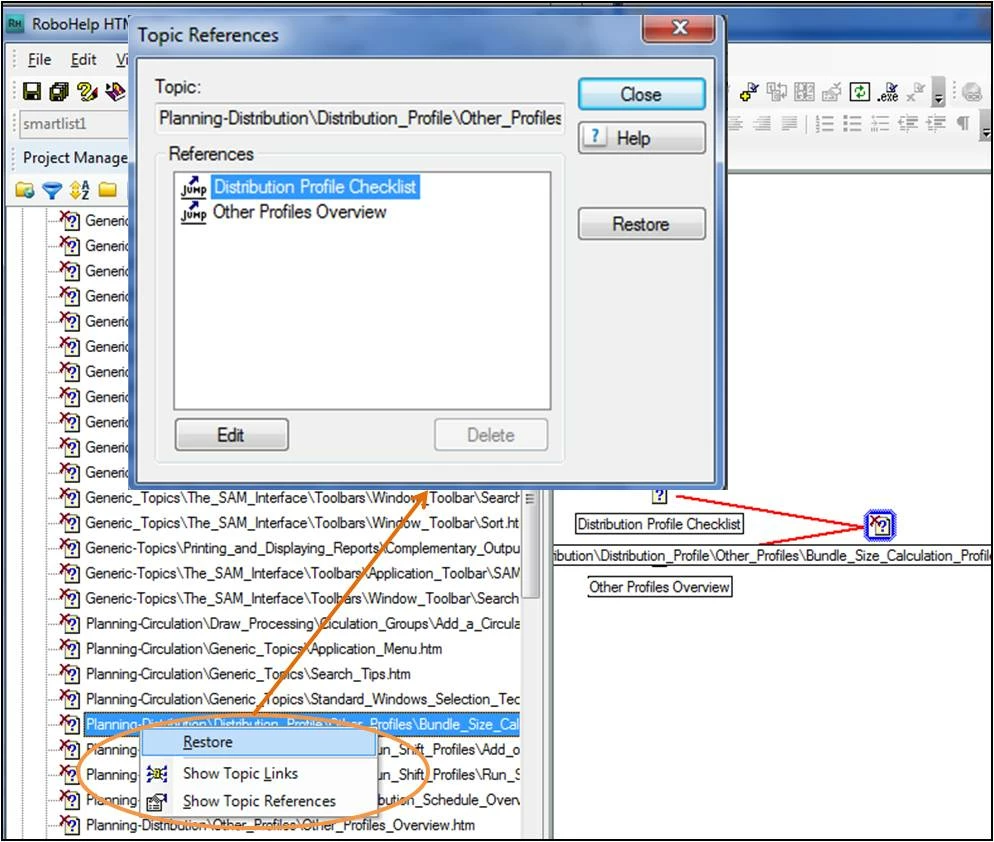
However, when I click on Restore within this dialog box, or even if I select the Show topic Link and try and restore, nothing happens. I tried to fix by going into one of the actual topics and deleting the link and then re-inserting and it and then saving the information, but it still remains. I unfortunately broke the links to actual topics that are utilized throughout the entire project, (like fundamental ones for generic searching and stuff)....so it now created havoc for me, and I just cant seem to get started with just one. I know if I can get one going, I will be able to quickly fix the others, but can't figure it out. (probably right under my nose).


 AdChoices