
Copy link to clipboard
Copied
I have a curious Browse Sequence (BS) problem with CHM from RH8.0.2.208 under Windows XP.
My BS is a flattened version of the ToC, so the user can simply browse through the entire CHM. I have "Auto-synchronize TOC" set in the Window Properties, and "Always Show Selection" in Advanced Settings of the SSL.
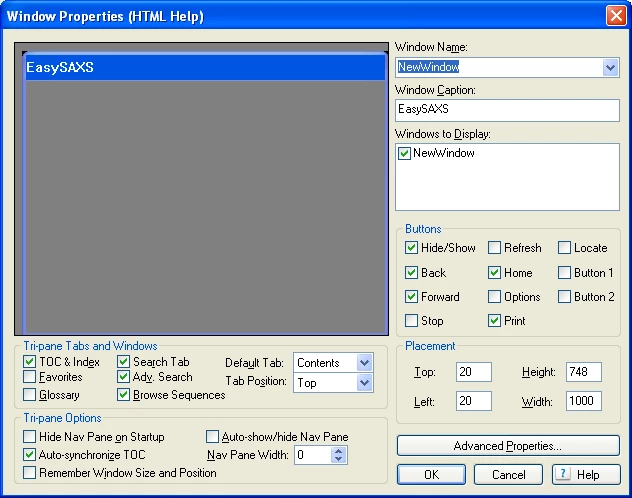
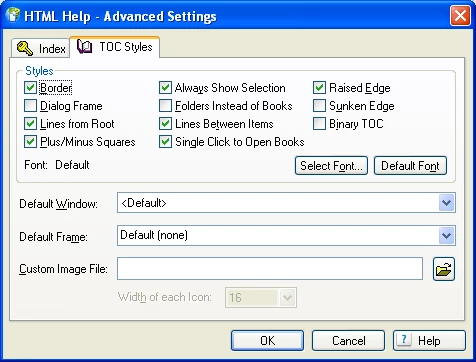
Most of the time it works as expected, the Next and Previous buttons move the highlight in the ToC and clicking in the ToC highlights the appropriate BS entry. But if I click on "Preferences - Reports" in the ToC then "Reports" is highlighted in the Browse Sequence. The Previous and Next buttons operate as shown in the BS window.
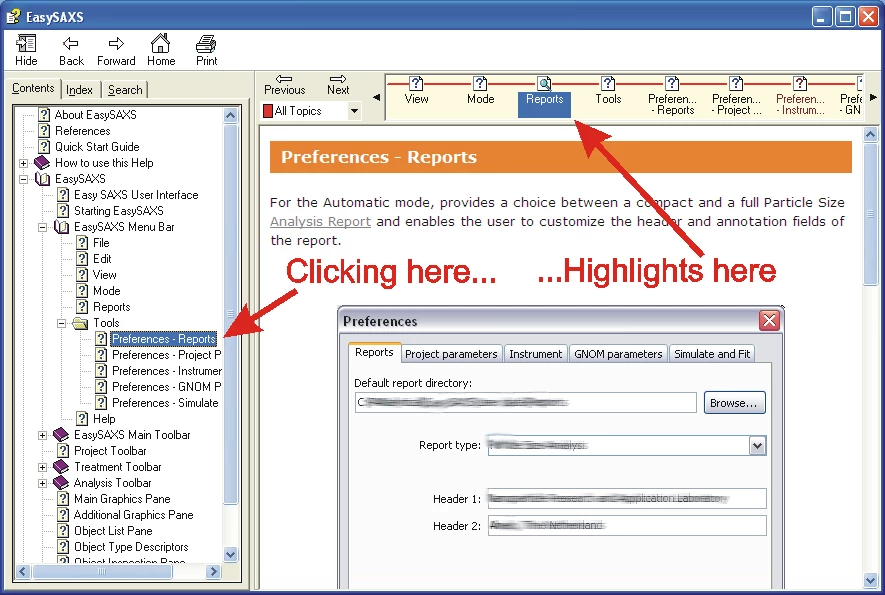
This occurs at just two places (out of 71 topics). I zapped the CPD but that didn't help. I renamed the problematic topics and the problem went away; but when I restored the names it came back. I looked in the HHC and BRS files using Notepad and the problem entries look OK.
Has anyone encountered anything similar or have suggestions for a solution?
--- Derek
Copy link to clipboard
Copied
Hi Derek
Is it possible that you have more than one topic with the same name? If so, that likely explains things. The synchronization is getting confused as to which topic should be synchronized. Usually we see this when a topic appears in more than one location in the TOC structure.
Cheers... Rick ![]()
| Helpful and Handy Links RoboHelp Wish Form/Bug Reporting Form Begin learning RoboHelp HTML 7 or 8 moments from now - $24.95! |
Copy link to clipboard
Copied
Thanks for reacting Rick.
No although the names are similar. Here are the Properties of both:
Click this in ToC...

...and you get this one in BS

The other pair which were confused are:
Click in ToC...

...and you get this in BS

However Preferences_Simulate.htm never got confused with Simulate.htm, so it doesn't seem to be a matter of one name being a subset of the other.
--- Derek
Copy link to clipboard
Copied
Hello again
Sooo, for the topics that get confused, do they exist in only one TOC location? Or do they exist in more than one location?
Cheers... Rick ![]()
| Helpful and Handy Links RoboHelp Wish Form/Bug Reporting Form Begin learning RoboHelp HTML 7 or 8 moments from now - $24.95! |
Copy link to clipboard
Copied
Just the one location; it is a straightforward hierarchical ToC arrangement.
--- Derek
Copy link to clipboard
Copied
I tried some more tests and am now totally confused.
I should mention that in the original project I generate not to the default path (...\!SSL!\Microsoft_HTML_Help) but to the location of my application in C:\Program Files. So I tried generaing to the default (local) path. I also tried making a new SSL and generating to both paths. Finally I made a copy of the complete project in another partition and did it all again.
These are the results. In the last test I pointed the New SSL of the Copy project at the Local directory of the New SSL of the Original project (gasp!)
| Database | SSL | Destination | Result |
|---|---|---|---|
| Original | Original | ProgFils | bad |
| Original | Original | Local ( !SSL! ) | bad |
| Original | New | ProgFils | bad |
| Original | New | Local ( !SSL! ) | bad |
| Copy | Original | ProgFils | bad |
| Copy | Original | Local ( !SSL! ) | good |
| Copy | New | ProgFils | bad |
| Copy | New | Local ( !SSL! ) | good |
| Copy | New | same as row 4 (see text) | bad |
H E L P ! ! !
--- Derek
PS I forgot to mention that this is repeatable: I can switch from `bad' to `good' and back.
Message was edited by: NL_Derek
Copy link to clipboard
Copied
Curiouser and curiouser!
The problem is not in RoboHelp at all; it seems to be some company based in Seattle.
I tried copying the CHM file to different places, and found that the very same file runs OK in "C:\__tmp\RoboHelp\!SSL!\Microsoft_HTML_Help" and goes wrong in "C:\Program Files\PANalytical\EasySAXS". As you can see from the earlier post, my test environment is the only place I have found which works correctly.
This is not a show-stopper; few if any users will switch from ToC navigation to BS navigation so I shall just release the CHM as it is. But my curiosity has been triggered. Anyone have any ideas how to investigate further?
--- Derek
PS My apologies to Seattle residents; I just remembered that BS are managed by HHActiveX.dll. My version is 8.0.0.203 and I cannot find a newer version anywhere.
Message was edited by: NL_Derek
Copy link to clipboard
Copied
I seem to have a lead on this; if there is a space in the full pathname it goes wrong, no space and it goes right. I tested in "D:\name space" and in "D:\name_nospace" and several other locations.
It might be a good idea to ask Microsoft to change the name of "C:\Program Files"; I'm sure they could make the change in just a few minutes. I can't imagine that it would have any side-effects.
I have reported it to Adobe as a bug.
Have a nice weekend,
--- Derek
Message was edited by: NL_Derek
Copy link to clipboard
Copied
Now I know how to reproduce the bug, I was able to strip out all content. I have made a zip file, size 1245kB showing the problem. Contact me off-list and I'll send it. I shall take a copy home so you can also try pc_rose AT zonnet DOT nl.
--- Derek
Get ready! An upgraded Adobe Community experience is coming in January.
Learn more