
May 3, 2010
Answered

Bullet List Breaks in RH8

  • May 3, 2010
  • 1 reply
  • 714 views

Hello,

After upgrading to RH8 my custom bullet styles have broken. As you can see in the screenshot, they render correctly in the RH designer, but in IE8, the first level bullet loses the space between the bullet and the text, and the second level bullet does not use the correct image.

Here is the relevant CSS:

UL {
    margin-top: 0pt;
    margin-bottom: 0pt;
}

P.Bullets {
    font-family: Verdana;
    font-size: 8.0pt;
    margin-left: -8pt;
    list-style: url("smallorange.jpg");
}
LI.P-Bullets {
    font-family: Verdana;
    font-size: 8.0pt;
    list-style: url("smallorange.jpg");
}

P.Bullet2 {
    font-family: Verdana;
    font-size: 8.0pt;
    margin-left: 8pt;
    list-style: url("Bullet2.jpg");
}
LI.P-Bullet2 {
    font-family: Verdana;
    font-size: 8.0pt;
    list-style: url("Bullet2.jpg");
}

And here is some sample html:

<ul>
    <li class="p-Bullets"><p class="Bullets">Level
     1 bullet .</p></li>
    <li class="p-Bullet2"><p class="Bullet2">Level
     2 bullet.</p></li>
    <li class="p-Bullet2"><p class="Bullet2">Another
     level 2 bullet.</p></li>
</ul>

Here's a screenshot of how it looks in IE8:
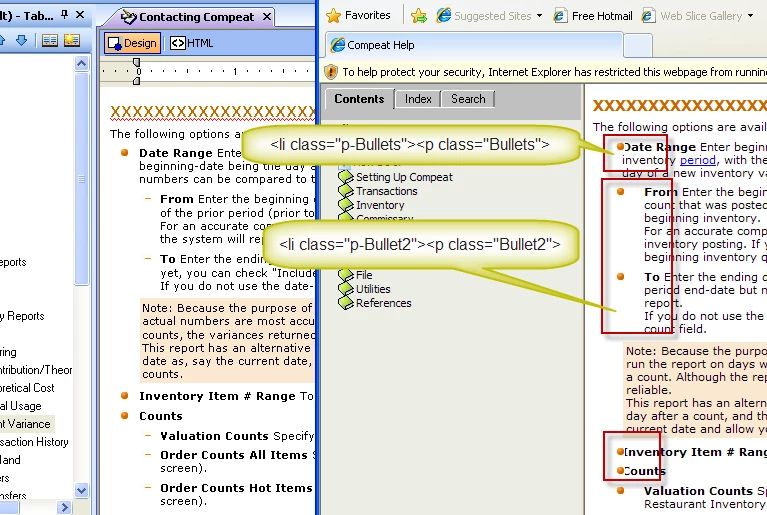
I created new li styles and dumped the paragraph, and that works fine for new content, but I have a lot of existing content with the paragraph inside the list item and so I would like to find a way to make it render corretly with the existing tags.

If anyone knows how I might be able to fix this, please let me know.

M.S

This topic has been closed for replies.
Correct answer Willam van Weelden

Hi,

A clean up may not be necessary. Remove the margin-left from the paragraph style (P.Bullet and P.Bullet2) to the list item style (Li.P-Bullet and Li.P-Bullet2). As long as all your lists use the list item styles, the indent should be fixed.

Greet,

Willam

This e-mail is personal. For our full disclaimer, please visit www.centric.eu/disclaimer.

1 reply

Peter Grainge
Community Expert
Community Expert
May 4, 2010

As you have found, the problem is related to stricter adherence to standards. If you haven't already seen them, these two links will tell you more.

http://www.wvanweelden.eu/robohelp/lists/lists.php

http://www.grainge.org/pages/authoring/rh_tour/index.htm (Look under New > Lists).

You also seem to be using images and that is not currently supported in the list editor. There is however a solution at

http://www.grainge.org/pages/authoring/rh8/rh8_lists.htm

I hate to say it but unless Willam has any alternative suggestions, it looks like that clean-up that you understandably want to avoid is going to be the only option. I wonder if a multifile find and replace tool would help? Make sure you back up before you start though.


See www.grainge.org for RoboHelp and Authoring tips

@petergrainge

Use the menu (bottom right) to mark the Best Answer or Highlight particularly useful replies. Found the answer elsewhere? Share it here.
Willam van Weelden
Willam van WeeldenCorrect answer
Inspiring
May 4, 2010

Hi,

A clean up may not be necessary. Remove the margin-left from the paragraph style (P.Bullet and P.Bullet2) to the list item style (Li.P-Bullet and Li.P-Bullet2). As long as all your lists use the list item styles, the indent should be fixed.

Greet,

Willam

This e-mail is personal. For our full disclaimer, please visit www.centric.eu/disclaimer.