
Bullet List Breaks in RH8
Hello,
After upgrading to RH8 my custom bullet styles have broken. As you can see in the screenshot, they render correctly in the RH designer, but in IE8, the first level bullet loses the space between the bullet and the text, and the second level bullet does not use the correct image.
Here is the relevant CSS:
UL {
margin-top: 0pt;
margin-bottom: 0pt;
}
P.Bullets {
font-family: Verdana;
font-size: 8.0pt;
margin-left: -8pt;
list-style: url("smallorange.jpg");
}
LI.P-Bullets {
font-family: Verdana;
font-size: 8.0pt;
list-style: url("smallorange.jpg");
}
P.Bullet2 {
font-family: Verdana;
font-size: 8.0pt;
margin-left: 8pt;
list-style: url("Bullet2.jpg");
}
LI.P-Bullet2 {
font-family: Verdana;
font-size: 8.0pt;
list-style: url("Bullet2.jpg");
}
And here is some sample html:
<ul>
<li class="p-Bullets"><p class="Bullets">Level
1 bullet .</p></li>
<li class="p-Bullet2"><p class="Bullet2">Level
2 bullet.</p></li>
<li class="p-Bullet2"><p class="Bullet2">Another
level 2 bullet.</p></li>
</ul>
Here's a screenshot of how it looks in IE8:
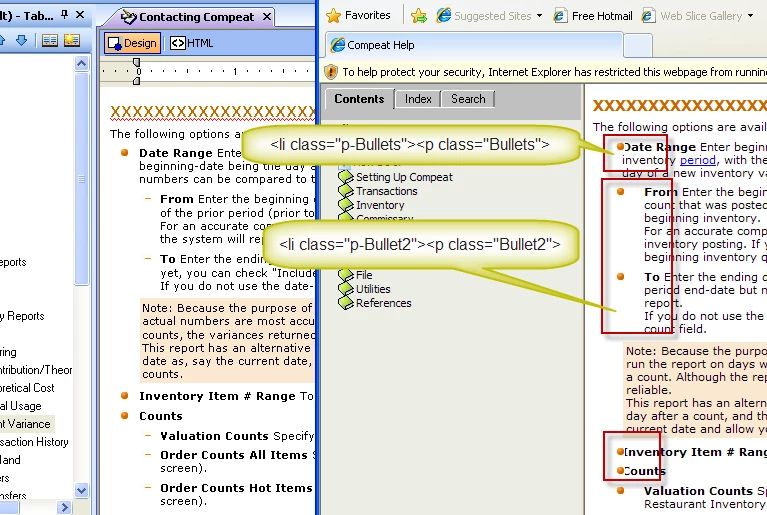
I created new li styles and dumped the paragraph, and that works fine for new content, but I have a lot of existing content with the paragraph inside the list item and so I would like to find a way to make it render corretly with the existing tags.
If anyone knows how I might be able to fix this, please let me know.
M.S
 AdChoices