us3f
Known Participant
November 26, 2012
Answered

bullet lists behaving strangely after generating projects in RH9

  • November 26, 2012
  • 1 reply
  • 1615 views

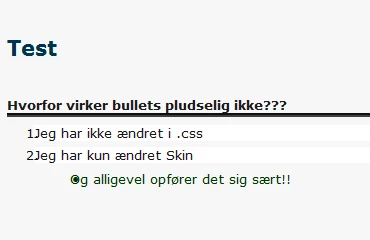
After a slight change in the projects Skin the bullet lists in all topics in all my projects has been changed so the space between bullet and text is gone (see picture) but modifying the Skind has never before affected the topics.

The bullet lists looks fine until I generate the projects???

And I haven't made any changes in the .css file!

This topic has been closed for replies.
Correct answer Peter Grainge

No worries. Useful to know it is all machines. Should be able to look at this later today.


See www.grainge.org for RoboHelp and Authoring tips

@petergrainge


The problem is your CSS and the reason you only see it in browsers is they cannot handle the errors. Here is the relevant bit. Your paragraph style (P.Steps) contains a list-style and your list style (Li.p-Steps) does not contain any list definitions.

P.Steps {

   list-style: decimal;

    margin-top: 4pt;

    margin-bottom: 4pt;

    color: #151515;

   margin-left: -10pt;

    background-color: #ffffff;

}

LI.p-Steps {

    list-style: decimal;

    color: #151515;

}

The problem is described on my site at http://www.grainge.org/pages/authoring/lists/lists.htm See the section on upgrading.

In this case I removed the redundant list-style from the paragraph style (highlighted blue) but the fix was the other highlighted line. You had applied a negative margin within the list so the browser moves the text 10pts left and then it bumps into the number.

Remove those lines and it generates OK.


See www.grainge.org for RoboHelp and Authoring tips

@petergrainge

1 reply

Peter Grainge
Community Expert
Community Expert
November 26, 2012

There is no way I can think of that modifying the skin would affect lists. Something else is at play here.

What version of Rh are you using and has that changed?

Do you have a backup you can restore?


See www.grainge.org for RoboHelp and Authoring tips

@petergrainge

Use the menu (bottom right) to mark the Best Answer or Highlight particularly useful replies. Found the answer elsewhere? Share it here.
us3f
us3fAuthor
Known Participant
November 27, 2012

Hi Peter

I'm using RH9 and my projects are the ones you helped me to upgrade from RH7 to RH9. Most things have worked fine since then (exept publishing on RH Server 9 but that's another story).

I opened a backup project and generated it and the same contraction in the bullet lists occurred...

I tried to open another backup on my colleague's computer (she hasn't been working with RH9 yet) and after generating that project the contraction wasn't there... but no hurrah! when I generated one of the projects that I already had generated on my own computer and therefore contained the strange looking bullet lists the error was still there.

So it seems like my installation of RH9 is messing up the bullet lists!? - a have tried to make a few test projects with one topic (and I use a copy of the .css file that I created years ago when Matthew Ellison taught me how to use RH and create .css files) but bullet lists are contracted after generating - it is terribly annoying...

Ulrik

Peter Grainge
Community Expert
Community Expert
November 29, 2012

Hi Peter

You're a genius! 


Now I can publish my new topics without messing up the appearance of the WebHelp.

Wonder why the problem started, I checked my old RH7 projects CSS files and they contained the lines I now have removed. But most important, now it works!

Thank you very much for your effort in helping me out of the mess.


The answer is CSS is from Rh7 or earlier and contains code written in the old style that Rh used.


See www.grainge.org for RoboHelp and Authoring tips

@petergrainge
Use the menu (bottom right) to mark the Best Answer or Highlight particularly useful replies. Found the answer elsewhere? Share it here.