Exit
  • Global community
    • Language:
      • Deutsch
      • English
      • Español
      • Français
      • Português
  • 日本語コミュニティ
  • 한국 커뮤니티
0

Can't access my project

Guest
Feb 16, 2010 Feb 16, 2010

Question1.png

Question2.png

I am working in Robohelp 8.

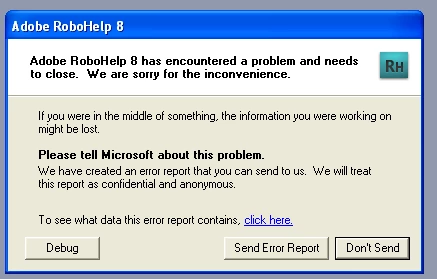
I tried to open my project and got the above errors.

It has been about 6 months since I opened this project.

I also tried to move files into the various folders, and create new folders and that didn't help.

Any suggestions on what to try would be appreciated.

Thanks.

532
Translate
Report
Community guidelines
Be kind and respectful, give credit to the original source of content, and search for duplicates before posting. Learn more
community guidelines

correct answers 1 Correct answer

Community Expert , Feb 16, 2010 Feb 16, 2010

Sorry, missed saying to backup the project, delete the CPD and then try opening it. See Opening Projects on my site.


See www.grainge.org for RoboHelp and Authoring tips

@petergrainge

Translate
LEGEND ,
Feb 16, 2010 Feb 16, 2010

What this message is telling you is that RoboHelp thinks there should be a folder inside your directory that does not currently exist. As a result the files that it thinks should be there will be shown as broken as a result. This is normally caused by files and folders being moved, renamed or deleted from outside RoboHelp. If the files that are shown as broken are in fact required, you will have to find them and import them to mend the broken links.


  • Read the RoboColum(n) for a tips, tricks and musings on the Technical Communication Suite products.
  • Follow the RoboColum(n) on Twitter
Translate
Report
Community guidelines
Be kind and respectful, give credit to the original source of content, and search for duplicates before posting. Learn more
community guidelines
Guest
Feb 16, 2010 Feb 16, 2010

I have tried to recreate the folders and files RH thinks are missing but it still doesn't find them. Also, I can't even open the project to move things in RH.

Any suggestions?

Pat

Translate
Report
Community guidelines
Be kind and respectful, give credit to the original source of content, and search for duplicates before posting. Learn more
community guidelines
Community Expert ,
Feb 16, 2010 Feb 16, 2010

Recreate them how? In Project Manager or Windows Explorer? The former is the way to do it.


See www.grainge.org for RoboHelp and Authoring tips

@petergrainge

Help others by clicking Correct Answer if the question is answered. Found the answer elsewhere? Share it here. "Upvote" is for useful posts.
Translate
Report
Community guidelines
Be kind and respectful, give credit to the original source of content, and search for duplicates before posting. Learn more
community guidelines
Community Expert ,
Feb 16, 2010 Feb 16, 2010
LATEST

Sorry, missed saying to backup the project, delete the CPD and then try opening it. See Opening Projects on my site.


See www.grainge.org for RoboHelp and Authoring tips

@petergrainge

Help others by clicking Correct Answer if the question is answered. Found the answer elsewhere? Share it here. "Upvote" is for useful posts.
Translate
Report
Community guidelines
Be kind and respectful, give credit to the original source of content, and search for duplicates before posting. Learn more
community guidelines
Resources
RoboHelp Documentation
Download Adobe RoboHelp