pweb248
Participating Frequently
August 13, 2014
Question

Can you help with RoboHelp Version 11: WebHelp Index Keyword Sorting?

  • August 13, 2014
  • 2 replies
  • 1267 views

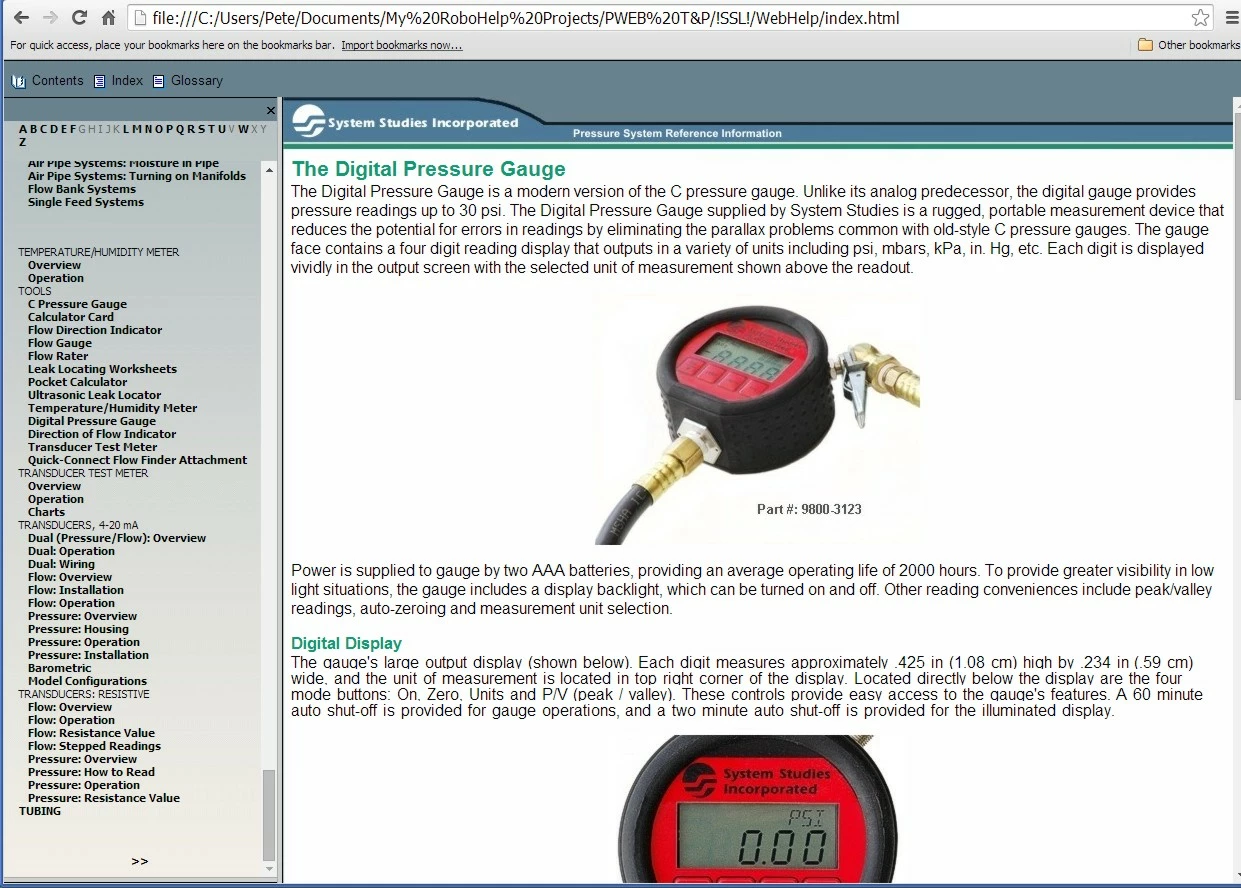
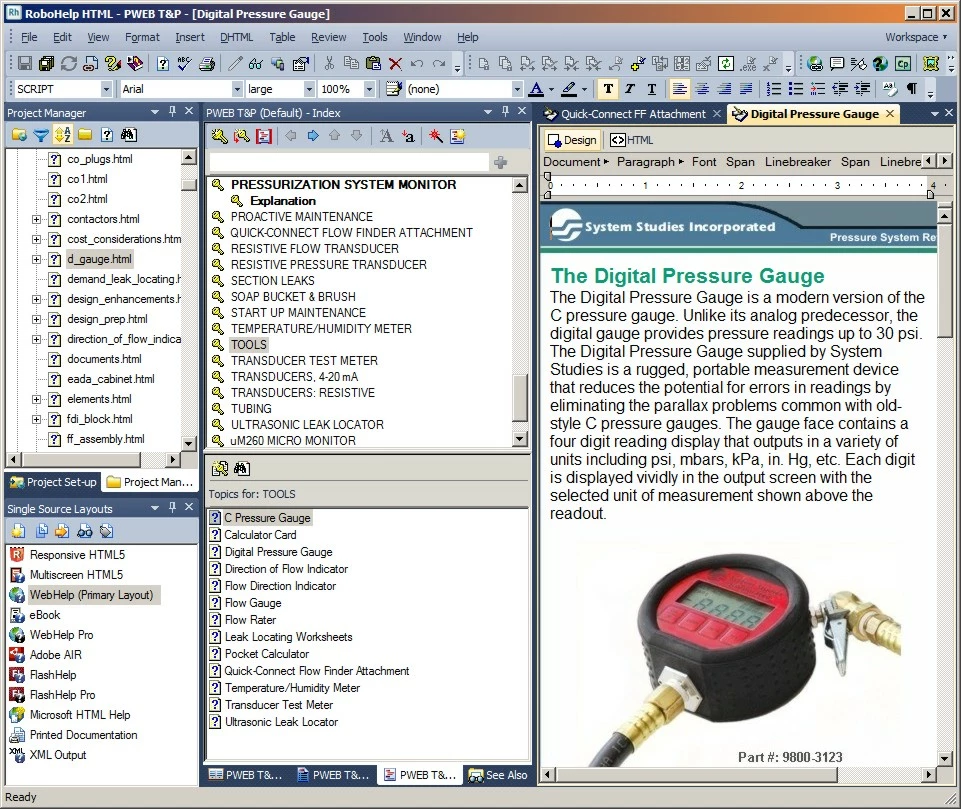
I'm new to RoboHelp 11, and I am finding it difficult to alphabetize topics listed under my Index Keywords. When I look at the keyword topics in my RoboHelp HTML editor, they are listed in alphabetical order (see the Tools topic in the first image), but when I generate WebHelp the Tools topics are not in the correct order (second image). I believe that the problem pertains to new entries made to a converted RoboHelp Version 6 WebHelp application. Basically, I have been adding content to several old version 6-generated html files in the new RoboHelp HTML editor.

Another issue that's perplexing is the fact that the Move Up and Move Down icons at the top of the Index editor pod, or whatever it's called, are grayed-out (not functioning). I remember with the Version 6 application, they worked fine.

Can anyone offer any suggestions on how to get the index alphabetized? I appreciate your help.
This topic has been closed for replies.

2 replies

Captiv8r
Legend
August 13, 2014

Hi there

In your Index Designer pod, try right-clicking the list of entries and see if you have Sort as an option...

If it's disabled as shown above, try clicking File > Project Settings... > General tab and you likely need to clear the "Binary Index" check box.

Once you disable Binary Index, Sort should now be an option for you.

Cheers... Rick

pweb248
pweb248Author
Participating Frequently
August 13, 2014

Thanks for the suggestion to clear the Binary Index. Unfortunately, from what I can tell, it did nothing. After closer review, however, it appears that the Indexer Designer pod does alphabetize each new Keyword Topic after I enter and link it. But when I generate the Primary Layout (WebHelp) the displayed outcome does not have the same organization. The new Keyword Topics are shown at the bottom of the indented Keyword Topic list in the order in which they were entered in the Designer pod. At least that's what it looks like in my default Google Chrome web browser.

Any other thoughts?

Captiv8r
Legend
August 14, 2014

Yes definitely. I cleared the Binary Index as you explained above and tried to sort the Keyword Topics in the editor, but I couldn't move anything up or down. Besides, as I mention above, the topics look alphabetized in RoboHelp. They just don't end up that way when I generate the webhelp html. In fact, after I cleared the Binary Index (or tried to), I generated my Primary Layout anyway, just to see. No change.

And, as a further experiment, in Project Settings, General, I unclicked "Add New Keywords to Index File (HHK)" but clicked the "Topics" radio button. So, the Binary Index check box is now unchecked, but Topics is checked. I then re-generated the webhelp html, but everything remained the same. Only the topics that were added to the Help program using RoboHelp 6 are display in the proper order.

Rick, should I set the Binary Index settngs back to the way they were?


Hello again

Okay, here's the deal with the arrows not working. If you changed the project settings so that Index Keywords are now added to Topics, the keywords simply aren't inside the Index (ProjectName.HHK) file for you to re-arrange. Those arrows allow you to act upon the keywords stored inside the HHK file.

It's still a mystery to me that RoboHelp would sort those entries oddly. Further confusing is that with Binary turned off, you are unable to right-click and choose to sort.

You likely unearthed a bug we haven't yet seen.

One thing I might try before just giving up and concluding there is a bug, would be to take the following steps.

Change the settings back so that no index keywords are stored inside topics.

Any keywords you created since making that change will likely need to be removed and re-added via the Index designer.

Click Tools > Options... > General and enable the option to clear the project cache (.CPD) when opening a project.

Close and re-open the project and see if things improve.

Cheers... Rick

Jeff_Coatsworth
Community Expert
Community Expert
August 13, 2014

Sorry, not really seeing what you’re talking about – the Tools index entry has a number of sub-entries under it – I’m presuming that the entry for C Pressure Gauge is appearing to launch the Digital Pressure Gauge topic because the text “C Pressure Gauge” appears on the first line. What’s out of order?