
Changing buttons breaks RH8 toolbar
Hello all,
Trying to make RoboHelp 8 look the way I want it, I changed the Bold-Italic-Underline buttons  by pasting in button images from Word, so that it looked like this
 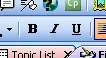 . I had done this on RH7 without problems.
Unfortunately this broke the pulldown menus for Apply Style, Change Font, Change Font Size and Zoom (see screenshot).

Resetting the toolbar (View>Toolbars>Customize>Toolbars>Formatting>Reset) followed by a restart, fixed it (but then I was back with the old TTT buttons instead of BIU).
Has anyone seen anything like this, or have any suggestions? Should I report it to Adobe as a bug?
Of course it could be a reference to the little poem by Piet Hein (quoting from memory):
Put up in a place / Where it's easy to see / The cryptic admonishment / T.T.T.
When you feel how depressingly / Slowly you climb / It's well to remember that / Things Take Time.
--- Derek
 AdChoices