
Exit
  • Global community
    • Language:
      • Deutsch
      • English
      • Español
      • Français
      • Português
  • 日本語コミュニティ
  • 한국 커뮤니티
1

Changing buttons breaks RH8 toolbar

Participant ,
Jun 03, 2009 Jun 03, 2009

Hello all,

Trying to make RoboHelp 8 look the way I want it, I changed the Bold-Italic-Underline buttons Buttons_TTT.png by pasting in button images from Word, so that it looked like this Buttons_BIU.png . I had done this on RH7 without problems.
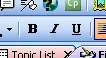
Unfortunately this broke the pulldown menus for Apply Style, Change Font, Change Font Size and Zoom (see screenshot).

YARH8T_3jun.png

Resetting the toolbar (View>Toolbars>Customize>Toolbars>Formatting>Reset) followed by a restart, fixed it (but then I was back with the old TTT buttons instead of BIU).

Has anyone seen anything like this, or have any suggestions? Should I report it to Adobe as a bug?

Of course it could be a reference to the little poem by Piet Hein (quoting from memory):

Put up in a place / Where it's easy to see / The cryptic admonishment / T.T.T.

When you feel how depressingly / Slowly you climb / It's well to remember that / Things Take Time.

--- Derek

1.1K
Translate
Report
Community guidelines
Be kind and respectful, give credit to the original source of content, and search for duplicates before posting. Learn more
community guidelines
Community Expert ,
Jun 03, 2009 Jun 03, 2009

Report it as a bug.

I get the same result. You might add it also breaks if you use Edit or apply one of the supplied images. All break the styles and font lists on re-opening RoboHelp.


See www.grainge.org for RoboHelp and Authoring tips

Help others by clicking Correct Answer if the question is answered. Found the answer elsewhere? Share it here. "Upvote" is for useful posts.
Translate
Report
Community guidelines
Be kind and respectful, give credit to the original source of content, and search for duplicates before posting. Learn more
community guidelines
Participant ,
Jun 03, 2009 Jun 03, 2009

Thanks Peter, I've reported it as a bug. It took me about 10 minutes to find the bug report page, but I managed it.

Translate
Report
Community guidelines
Be kind and respectful, give credit to the original source of content, and search for duplicates before posting. Learn more
community guidelines
Community Expert ,
Jun 03, 2009 Jun 03, 2009

I usually add the link. Apologies.


See www.grainge.org for RoboHelp and Authoring tips

Help others by clicking Correct Answer if the question is answered. Found the answer elsewhere? Share it here. "Upvote" is for useful posts.
Translate
Report
Community guidelines
Be kind and respectful, give credit to the original source of content, and search for duplicates before posting. Learn more
community guidelines
New Here ,
Nov 24, 2009 Nov 24, 2009

I also brock the tool bar by importing a word document. Resetting the tool bar as perscriped above fixed it. 

Translate
Report
Community guidelines
Be kind and respectful, give credit to the original source of content, and search for duplicates before posting. Learn more
community guidelines
Community Expert ,
Nov 24, 2009 Nov 24, 2009

Not sure how you managed that. The original problem was fixed by applying patch 8.0.1. Do you have that applied?

Try that and try right clicking the toolbar, then Customise, then Reset.


See www.grainge.org for RoboHelp and Authoring tips

Follow me @petergrainge

Help others by clicking Correct Answer if the question is answered. Found the answer elsewhere? Share it here. "Upvote" is for useful posts.
Translate
Report
Community guidelines
Be kind and respectful, give credit to the original source of content, and search for duplicates before posting. Learn more
community guidelines
New Here ,
Nov 25, 2009 Nov 25, 2009
LATEST

Peter, Thanks for the fast responce. I applied the the 8.0.1 patch after problem was corrected. Haven't had a problem since. Again, thanks for the fast resonce.

Translate
Report
Community guidelines
Be kind and respectful, give credit to the original source of content, and search for duplicates before posting. Learn more
community guidelines
Resources
RoboHelp Documentation
Download Adobe RoboHelp