
Exit
  • Global community
    • Language:
      • Deutsch
      • English
      • Español
      • Français
      • Português
  • 日本語コミュニティ
  • 한국 커뮤니티
0

Changing "selected" appearance in WebHelp toolbar

New Here ,
Oct 24, 2011 Oct 24, 2011

Hi,

Does anyone know if it's possible to change the white lines that appear in the WebHelp toolbar when you select one of the main navigation elements such as "Contents" or "Search"? Specifically, I'd like to alter the white lines that appear on the bottom and right side of the selected rectangular "region." I want to use a color other than white. Please see the attached image.
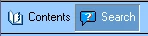
help_toolbar.png

In my case, I'm using a custom skin with much darker colors in the toolbar area. So the starkness of the white lines is less than ideal, giving the effect that there appears to be a missing graphic. Is there a setting I can change or insert in the .skn file that will allow me to specify a different color for those two lines?

I'm using RH9 running on Windows XP.

Thanks in advance for any insight someone can provide.

    -Kevin

455
Translate
Report
Community guidelines
Be kind and respectful, give credit to the original source of content, and search for duplicates before posting. Learn more
community guidelines
LEGEND ,
Oct 24, 2011 Oct 24, 2011

Hi there

Perhaps the simplest of all ways would be to create images that look exactly as you want and substitute those. Note that what you are seeing depicts WebHelp where text is used alongside images in the main toolbar. The outlines go away if text isn't used.

Cheers... Rick

Helpful and Handy Links

RoboHelp Wish Form/Bug Reporting Form

Begin learning RoboHelp HTML 7, 8 or 9 within the day!

Adobe Certified RoboHelp HTML Training

SorcerStone Blog

RoboHelp eBooks

Translate
Report
Community guidelines
Be kind and respectful, give credit to the original source of content, and search for duplicates before posting. Learn more
community guidelines
New Here ,
Oct 24, 2011 Oct 24, 2011
LATEST

Hi Rick-

Oh cool. I didn't know that -- that the outlines will go away if I don't provide a text string. I'll give the image method a try.

Thank you!

   -Kevin

Translate
Report
Community guidelines
Be kind and respectful, give credit to the original source of content, and search for duplicates before posting. Learn more
community guidelines
Resources
RoboHelp Documentation
Download Adobe RoboHelp