
Changing "selected" appearance in WebHelp toolbar
Hi,
Does anyone know if it's possible to change the white lines that appear in the WebHelp toolbar when you select one of the main navigation elements such as "Contents" or "Search"? Specifically, I'd like to alter the white lines that appear on the bottom and right side of the selected rectangular "region." I want to use a color other than white. Please see the attached image.
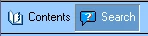
In my case, I'm using a custom skin with much darker colors in the toolbar area. So the starkness of the white lines is less than ideal, giving the effect that there appears to be a missing graphic. Is there a setting I can change or insert in the .skn file that will allow me to specify a different color for those two lines?
I'm using RH9 running on Windows XP.
Thanks in advance for any insight someone can provide.
-Kevin
 AdChoices