
Participant
August 8, 2017
Answered

creating links to the bookmark between topics

  • August 8, 2017
  • 1 reply
  • 1102 views

Hi, there(especially Captiv8r_)

(After i found out you are the only one who answers in this Robo forum lol)

I'd like to make hyperlinks to the specific paragraph of the specific topic, not to just entire topic.

I see there is a "Bookmark" function in the manual, but it looks like the bookmarks is only linked within the topic, not between topics.
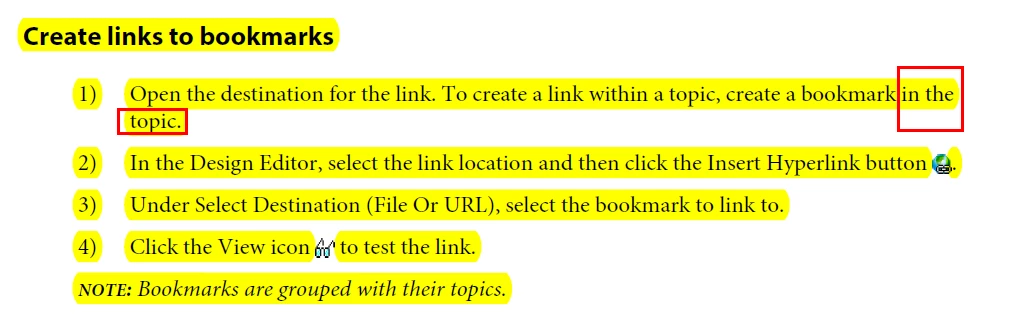
Is there anyway i could make bookmarks link to between topics, or

make hyperlinks to the specific paragraph of the specific topic?

Thank you in advance.!
This topic has been closed for replies.
Correct answer Captiv8r

Hi there

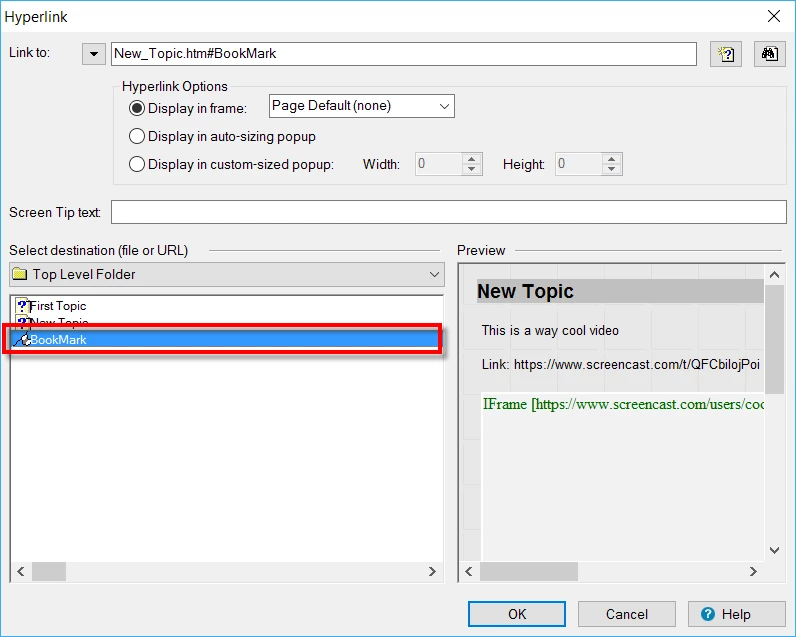
Pretty straightforward. Just find the topic and bookmark you want. Click the bookmark.

Cheers... Rick

1 reply

Captiv8r
Captiv8rCorrect answer
Legend
August 8, 2017

Hi there

Pretty straightforward. Just find the topic and bookmark you want. Click the bookmark.

Cheers... Rick

Participant
August 8, 2017

One more question!

[Insert] -> [Bookmark]

this is how i make bookmark, but i can't find generated bookmark file under project manager..

(which means i didn't generate bookmarks and leaves me nothing when i look for bookmark in hyperlink window)

What do you think i'm doing wrong here? I need your help desperately.

Thank you again !

Peter Grainge
Community Expert
Community Expert
August 8, 2017

Well just to prove your first statement in this thread wrong...

When you create the bookmark, initially nothing will show in Project Manager. That only happens when you save the topic where you have created the bookmark(s). Then you do not see a new file because there isn't one. What you should see is a + sign to the left of the topic name or file name (depending on which you use in Project Manager).

Are you saying that are saving the topic where you have created the bookmark the + sign does not show?


See www.grainge.org for RoboHelp and Authoring information

@petergrainge

Use the menu (bottom right) to mark the Best Answer or Highlight particularly useful replies. Found the answer elsewhere? Share it here.