Inspiring
February 16, 2015
Answered

CSS is suddently missing from Project Manager (RH10)

  • February 16, 2015
  • 1 reply
  • 1772 views

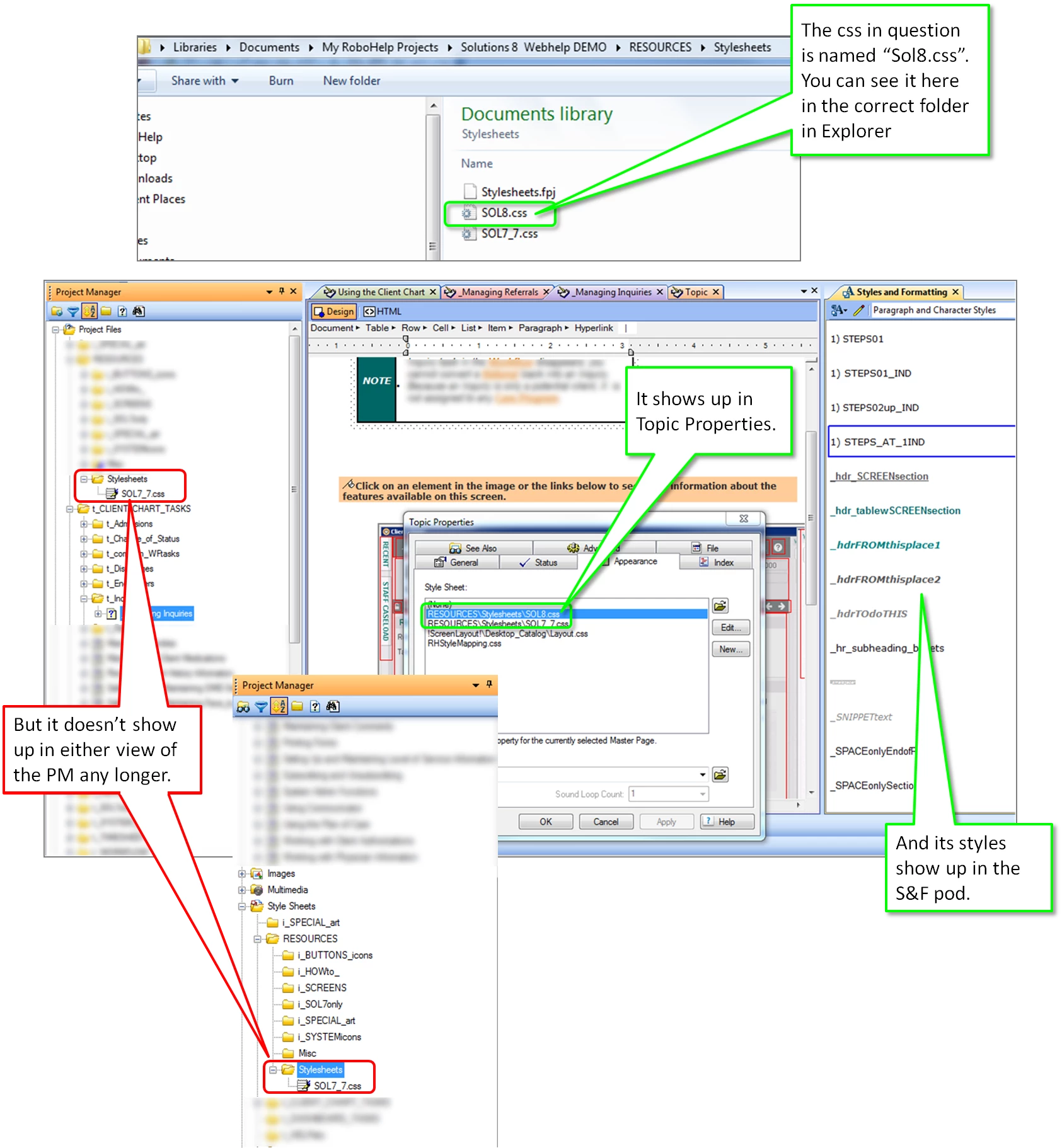
Suddenly, my main css (named "Sol8.css) isn't showing up in the Project Manager... it shows everywhere else, but there.. see attached image. I have no idea why this is suddenly the case.  I would like to be able to access it for editing in the HTML editor within RoboHelp 10... what happened?

HELP! and Thanks...

    This topic has been closed for replies.
    Correct answer Amebr

    ok... next thing is, I created a new topic in the SS folder thinking if it acted like it did with the other topic, it would just drop the css into the same folder (this time Stylesheet where the new topic is)... but then it came up and asked me if i wanted to overwrite the existing Sol8. css.. so i said yes... and it still didn't show up in the SS folder.

    If i unlink the css "already being used in the project" from the topics its linked to, it disappears again...

    if i go into a Topic's properties and try to use the browse link to browse to the Resource/SS folder of the same project, it tells me it's already there and i can't add it again... but i still can't see it in PM.

    I have tried every combo i can think of.. and deleted the CPD every other time... good lord!


    Actually, you might find that deleting the cpd is causing the css file to vanish. (I've seen it affect some (but not all) images as well, and in fact was a major reason my last job switched to Madcap Flare.)

    Try this:

    (NOTE: if it's a really large project, you might need to go out for coffee or lunch. Basically this will refresh the RH file list database (my interpretation), which can take a long time for large projects. We had one that took an hour.)

    1. Create a new folder. It can be anywhere and called anything and you can delete it in a moment.
    2. Check if your css file is displaying in Project Manager again.
    3. Delete the new folder you just created.

    If this works, you'll have to create and delete a new folder when you want to edit the stylesheet after you delete the cpd (or just use windows explorer and an external editor).

    Please also report this as a bug to Adobe. I've done so on a couple of occasions, but most people look at me like I'm mad. Which reminds me, I should report it again and link to this thread.

    If it doesn't work, sorry, I'm out of ideas.

    (Edit: Bug submitted with link to this thread and also https://forums.adobe.com/message/3478909)

    1 reply

    Captiv8r
    Legend
    February 16, 2015

    Hi there

    Perhaps try right-clicking the Project Manager and choosing Explore. This should open Windows Explorer in your project location. Then close the project. Locate and delete the CPD file and re-open the project. See if that fixes it.

    If you are hinky about deleting the CPD, just rename it to a CPDX.

    Cheers... Rick

    ktbFLAuthor
    Inspiring
    February 16, 2015

    nope... didn't work.. :-(

    I had deleted the cpd  a couple of times already so i don't worry about that... I thought maybe your idea about selecting "Explore" might help.. but no.. is there a way to manually add it back into PM? i have tried, but can't find a way to do that.

    ktbFLAuthor
    Inspiring
    February 16, 2015

    ok... lemme try that.. thanks.. brb


    ok... really bizarre behavior IMHO.. so I tried selecting a topic, then changing the css to the Sol7 that shows up... save, then change it back to Sol8... still didn't appear in the SS folder.

    Then i tried applying Sol 8 to all topics via the Topics List pod... no change... then I tried changing them all to Sol7... then back to Sol8.. no change. Then i tried saving all to the RHMapping CSS and that made the Sol7 file disappear from the folder as well... then suddenly, i noticed a link to Sol8 in a topic folder... and voila.. there it was... even tho everywhere else it shows up in the Resources>SS folder...

    so i tried dragging the Sol8 file back into the SS folder... but i kept getting an error that i couldn't do that because it was being used in the project... ok.. but shouldn't i be able to change the location of my files?  So, it let me change the name.. and then i was able to move it to the SS folder, but when i tried to name it back to the original name, it didn't let me... (see attached error)