

fortangela1000
Known Participant
September 20, 2010
Answered

Current Page in Breadcrumbs Showing Default Paragraph Font

  • September 20, 2010
  • 1 reply
  • 1207 views

I have my body and all my styles set to Arial. All my breadcrumbs are showing in Arial EXCEPT the page I'm on. Here's what it looks like:

Home > IMPACT ERM® Suite > Additional Functionality > IMPACT® IntelaTrac > Configure IntelaTrac Administration Application

I want the current page to also appear in Arial. Does anyone know how I might achieve this continuity? I am guessing it is using the default paragraph font of Times New Roman 12pt, which I apparently can't change in the Styles and Formatting pod.

This is a problem for both my WebHelp and FlashHelp projects, which is why I didn't post to a thread specifically for either of those.

I'm on RH8.0.2.208

Windows 7 32-bit

Thanks!
This topic has been closed for replies.
Correct answer Captiv8r

I enabled them globally in the generation (Add Breadcrumb Links). Doing this put the following in my .css:

A.breadcrumbs {

font-family: Arial;

font-size: 13px;

}

p.breadcrumbs {

font-family: Arial;

font-size: 13px;

}

I have .css that I created manually, but the breadcrumbs were not. They were added by RH. Not to mention, it decides to put obsolete x-next classes in there every now and then when I use the Styles and Formatting Pod. Guess what...not W3C compliant. Sorry if i'm sounding bitter. I was not this way once upon a time. Pre-Window 7 upgrade.


LOL, no worries. I totally understand. My personal bitterness this week is working with WordPress and some PHP scripts I purchased to work with the PayPal payment gateway. But I digress...

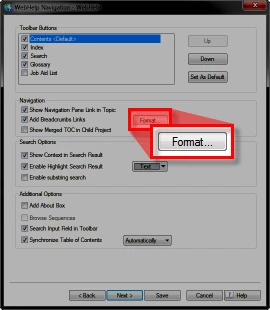
Cool beans. You have enabled the global breadcrumbs. Did you also examine the properties by clicking the Format button in the Single Source Layouts dialog?

Perhaps you need to experiment with the settings there?

Cheers... Rick

Helpful and Handy Links

RoboHelp Wish Form/Bug Reporting Form

Begin learning RoboHelp HTML 7 or 8 moments from now - $24.95!

Adobe Certified RoboHelp HTML Training

SorcererStone Blog

RoboHelp eBooks

1 reply

fortangela1000
Known Participant
September 20, 2010

Although you can't tell in the above breadcrumbs example, the current page is in Times New Roman 12pt, while the

breadcrumb links are as they should be, in Arial 14px.

fortangela1000
Known Participant
September 22, 2010

I sure wish someone could answer me.

fortangela1000
Known Participant
September 22, 2010

Hi there

There are a few variables that we don't know the answer to.

Breadcrumbs may be inserted in different ways.

  • You can insert them into a page using a placeholder.
  • You can insert them into a Master page using a placeholder
  • You can enable them globally at the time you create output

Depending on how you inserted them you have different options for formatting.

So how did you insert them?

Cheers... Rick

Helpful and Handy Links

RoboHelp Wish Form/Bug Reporting Form

Begin learning RoboHelp HTML 7 or 8 moments from now - $24.95!

Adobe Certified RoboHelp HTML Training

SorcererStone Blog

RoboHelp eBooks


I enabled them globally in the generation (Add Breadcrumb Links). Doing this put the following in my .css:

A.breadcrumbs {

font-family: Arial;

font-size: 13px;

}

p.breadcrumbs {

font-family: Arial;

font-size: 13px;

}

I have .css that I created manually, but the breadcrumbs were not. They were added by RH. Not to mention, it decides to put obsolete x-next classes in there every now and then when I use the Styles and Formatting Pod. Guess what...not W3C compliant. Sorry if i'm sounding bitter. I was not this way once upon a time. Pre-Window 7 upgrade.