
Participant
October 17, 2011
Answered

Custom RH9 WebHelp skin: Problem opening PDF file from custom button

  • October 17, 2011
  • 1 reply
  • 614 views

Hi, I've been troubleshooting and checking forums trying to figure out how to get a PDF file to open from a custom button on my WebHelp skin. It worked for me once upon a time, but I changed something in the document and tried to upload the new version and it has errored out ever since.
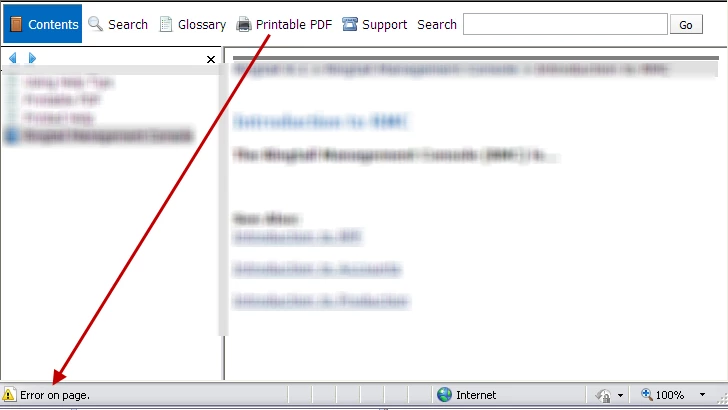
I want to have the ability to open the PDF in a new window from the custom button (called 'Printable PDF' on my skin), so I am using the following custom JavaScript in the 'Click On' field of the the custom button's components: window.open('print_test.pdf','printWindow','menubar=0,resizable=0,width=900,height=500,scrollbars=1');  I know the script is good because I have the same script for the Support custom button and it works great. The only difference between those scripts is the Support script calls an .html file instead of a PDF and the window names says 'supportWindow' instead of 'printWindow'.

.
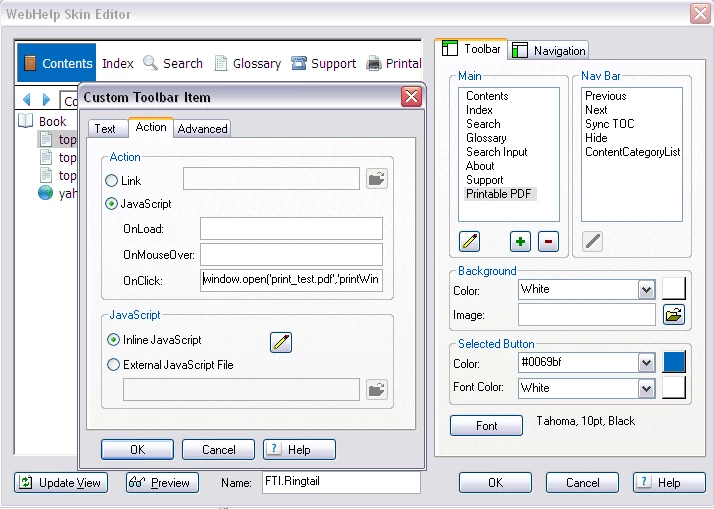
I've tried deleting and recreating the custom button, changing the JavaScript with a developer's help, generating the help on another machine thinking it was a glitch with my browser (using IE8) or RoboHelp license, and combing the help files numerous times. I've also ensured that the PDF file is stored in the skin and project folders along with the other project files/folders. I've used previous versions of RoboHelp and had no problems attaching a Word document and PDF, so I'm wondering if this is a bug in RH9?? Especially since it worked for me initially. Any assistance and/or fresh ideas are welcomed! Thank you!

This topic has been closed for replies.
Correct answer Captiv8r

Hello again

Try disabling MOTW and generating again. Then test and jump through the hoops MOTW saves you from jumping through. (Yellow Information Bar and all that)

My guess is that MOTW is inhibiting things. Once you publish this content to a server you should be good.

Cheers.. Rick

Helpful and Handy Links

RoboHelp Wish Form/Bug Reporting Form

Begin learning RoboHelp HTML 7, 8 or 9 within the day!

Adobe Certified RoboHelp HTML Training

SorcerStone Blog

RoboHelp eBooks

1 reply

Captiv8r
Legend
October 17, 2011

Hi there and welcome to our community

How are you testing? From your local hard drive or after uploading to a server?

Do you have Mark of the Web enabled?

Cheers... Rick

Helpful and Handy Links

RoboHelp Wish Form/Bug Reporting Form

Begin learning RoboHelp HTML 7, 8 or 9 within the day!

Adobe Certified RoboHelp HTML Training

SorcerStone Blog

RoboHelp eBooks

Participant
October 17, 2011

Hi Rick,

Thank you. I'm generating off of my local drive and I do have Mark of the Web enabled.

~Sarah

Captiv8r
Captiv8rCorrect answer
Legend
October 17, 2011

Hello again

Try disabling MOTW and generating again. Then test and jump through the hoops MOTW saves you from jumping through. (Yellow Information Bar and all that)

My guess is that MOTW is inhibiting things. Once you publish this content to a server you should be good.

Cheers.. Rick

Helpful and Handy Links

RoboHelp Wish Form/Bug Reporting Form

Begin learning RoboHelp HTML 7, 8 or 9 within the day!

Adobe Certified RoboHelp HTML Training

SorcerStone Blog

RoboHelp eBooks