Inspiring
December 27, 2020
Answered

Customize a Mini Toc

  • December 27, 2020
  • 5 replies
  • 1933 views

I'm working with RoboHelp 2019 (2019.0.14) - not the Classic version. I see in the RoboHelp User Guide that you can customize a Mini Toc. It says: "Click the Mini TOC placeholder to set its properties." 


However, when I do as instructed, I get a warning that: "It is read only content"


Any ideas? How can I customize the Mini TOC?


Thanks.

This topic has been closed for replies.
Correct answer Peter Grainge

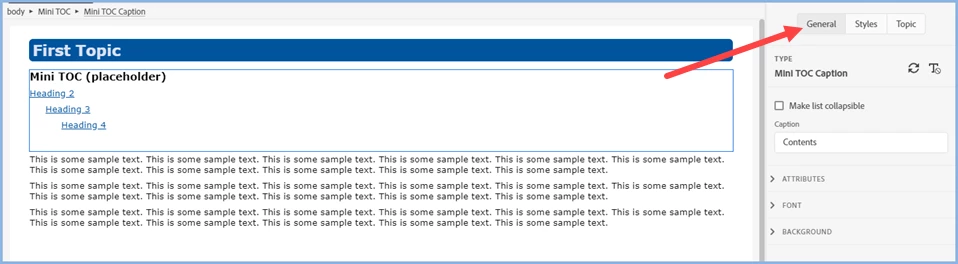
When you click in the Mini TOC you should see the options in Properties on the right. Change Contents and other settings as required. 


________________________________________________________
See www.grainge.org for free Authoring and RoboHelp Information

5 replies

Community Expert
June 8, 2022

If you put the code I suggested into a custom css in the skin (under user assets) it won't be changed and should work. I'm not sure that's the recommended way to do it, but as a hack it seems to work...

Inspiring
June 8, 2022

Thank you Amebr!  That seems to be working.

For others unfamiliar with User Assets, I found this topic to educate myself on where to add it.

Community Expert
June 8, 2022

It's changing it because it expects a certain structure asnd needs to make sure the css doesn't inadvertently affect other areas of the layout, I think.


See if this works (I just switched the centre panel and mobile view classes around - I assumed the first bit works as you didn't specify what did and didn't work):

.RH-LAYOUT-CENTERPANEL-topic-box .minitoc, .RH-LAYOUT-FOOTER-container .minitoc {
display: none;
}

.RH-LAYOUT-BODY-mobile-view .RH-LAYOUT-CENTERPANEL-topic-box .minitoc,  .RH-LAYOUT-BODY-mobile-view .RH-LAYOUT-FOOTER-container .minitoc
{
display: block;
}


Inspiring
June 8, 2022

Actually the first bit was the part that did NOT work. The mini-TOC would not disappear in full desktop mode.  Nevertheless I tried something similar to what you suggested and it still did not work.


RoboHelp keeps modifying my desired CSS (when generating the ouput) so it no longer works as intended.


After I get some sleep, maybe I'll read this support topic, and see if that helps.


Community Expert
June 8, 2022

I'll try your code tonight and see what I can find.

Peter Grainge
Community Expert
Peter GraingeCommunity ExpertCorrect answer
Community Expert
December 27, 2020

When you click in the Mini TOC you should see the options in Properties on the right. Change Contents and other settings as required. 


________________________________________________________
See www.grainge.org for free Authoring and RoboHelp Information

Use menu (bottom right) to mark as Best Answer or to Highlight particularly useful replies. Found the answer elsewhere? Share it here.
Inspiring
December 27, 2020

Thank you. Exactly what I was looking for!

Peter Grainge
Community Expert
Community Expert
December 27, 2020

I don't think those changes are possible but to be sure I need to know which skin you are using.

________________________________________________________
See www.grainge.org for free Authoring and RoboHelp Information

Use menu (bottom right) to mark as Best Answer or to Highlight particularly useful replies. Found the answer elsewhere? Share it here.
Inspiring
December 27, 2020

I'm using Indigo Blue. 

Inspiring
December 27, 2020

Sorry, I meant "Azure Blue"

Peter Grainge
Community Expert
Community Expert
December 27, 2020

What is meant is that you can customise the styles in the CSS.

________________________________________________________
See www.grainge.org for free Authoring and RoboHelp Information

Use menu (bottom right) to mark as Best Answer or to Highlight particularly useful replies. Found the answer elsewhere? Share it here.
Inspiring
December 27, 2020

By default, it displays a header (the word "Contents") and headings 1-4. I want to remove the word "Contents" or change it to something else and only display headings 1-3.