September 15, 2010
Question

Drop Down Text Effects

  • September 15, 2010
  • 1 reply
  • 1226 views

Hi there.

I'm created topics currently that have drop down text effects in them.

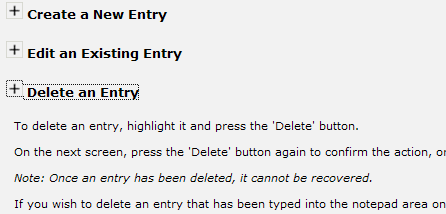
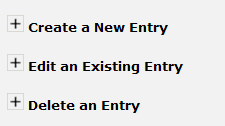
Basically, I have a title which has got a little image next to it (a plus expand sign image).

When you click either the image of the title text, the drop down text appears as intended.

Is there anyway I can get it, so that when you click either the text or the image, the image changes to be a minimise image?

The screenshots below demonstrate what I mean a bit clearer.
Thanks very much,


Craig

    This topic has been closed for replies.

    1 reply

    Captiv8r
    Legend
    September 15, 2010

    Hi there

    If you are using RoboHelp 8, you can edit your style sheet to include "Twisty" images that do this.

    If you are using an earlier version of RoboHelp, fellow Community Professional Peter Grainge has info on his site at the link below.

    Click here to view

    Cheers... Rick

    Helpful and Handy Links

    RoboHelp Wish Form/Bug Reporting Form

    Begin learning RoboHelp HTML 7 or 8 moments from now - $24.95!

    Adobe Certified RoboHelp HTML Training

    SorcererStone Blog

    RoboHelp eBooks

    September 15, 2010

    Thanks for the quick reply.

    Do they work in CHM files?

    Captiv8r
    Legend
    September 15, 2010

    Hello again

    I can't fathom why they wouldn't. You may need to add the images to baggage, but other than that they should be fine.

    Cheers... Rick

    Helpful and Handy Links

    RoboHelp Wish Form/Bug Reporting Form

    Begin learning RoboHelp HTML 7 or 8 moments from now - $24.95!

    Adobe Certified RoboHelp HTML Training

    SorcererStone Blog

    RoboHelp eBooks