
ePub Creation - TOC FILE MISSING - issues with 7zip VS zip.exe
Since this question isn't actually answered - IE, the same issues are occurring that I found elsewhere with the ePub Script, I needed to reup the question.
Here's my biggest issue - when 7zip is selected BY RoboHelp to generate an ePub, it does not work.
However, when RoboHelp tells me to select zip.exe from stahlforce.com/dev/zip.exe, it works just fine.
But there's no way for me to set ZIP.EXE as the standard choice when I build an ePub and run the script - it immediately tells me TOC FILE MISSING as it's doing the Creating NCX(TOC) file.
Caveats:
- Yes, I'm aware of the other discussions at the other locations of http://forums.adobe.com/message/4276654 and http://forums.adobe.com/message/3155109. They're not very clear or helpful as to what to actually do to go through and troubleshoot what's up.
- Praful already showed me the link at http://www.computerhope.com/issues/ch000549.htm that talks about how to add C:\Windows\System32 to the path variable. Didn't work - mainly because it was already there.
- Each time RoboHelp generates the ePub script in the following window:
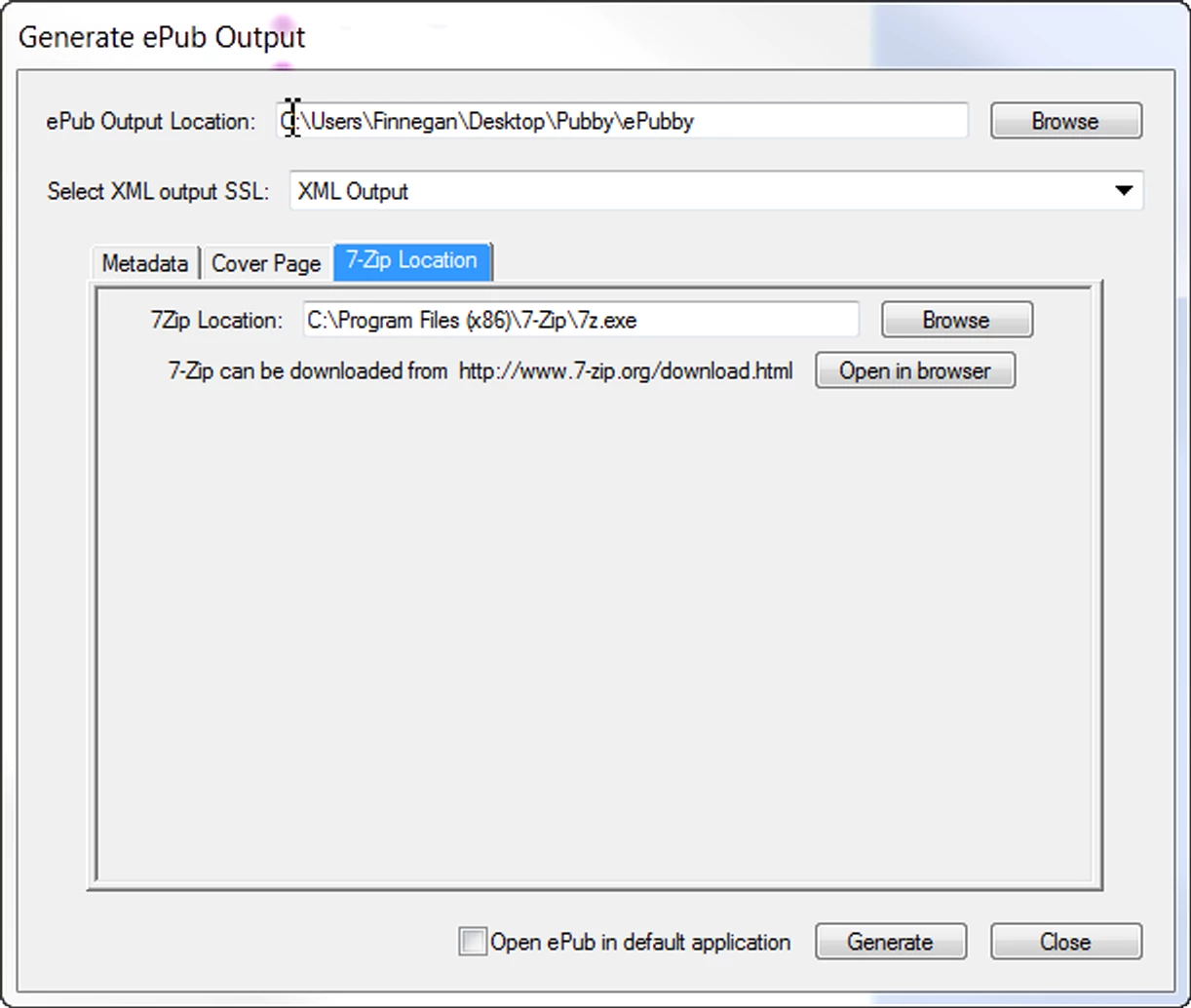
I still get an error.
This occurs if the XML Generate file is in the SSL folder of the project or not, regardless of whether it's on a C drive or an E drive (or a network drive, USB key, etc etc etc)
If I manage to, by some MIRACLE, get it to use zip.exe instead, it'll cheerfully compile with a TOC.
My system path already has System32 in it. No need to modify it.
System: Windows 7 Professional 64-bit
7zip: latest build
RoboHelp: 9.0.2 in ATCS3
Thus far, I have:
1. Removed all the spaces from my Project Name and ePub outputs per this post: http://forums.adobe.com/message/3155109#3155109
2. Followed Praful's instructions to the letter after contacting him to find out exactly how one goes about adding the system32 to the Path variables.
3. Run the generator fifty-nine times.
Out of those fifty-nine times, I have also:
A. Downloaded 32-bit 7zip and used it as the Zip source, and it craps the bed with a TOC Missing error. No go.
B. Downloaded 64-bit 7zip and used it as the Zip source, and it craps the bed with a TOC Missing error. No go.
C. Downloaded zip.exe as requested, used it as the Zip source, HOORAY! It works!
D. Try to replicate, it goes back to 7zip and craps the bed. KHAAAAAAAAAAAN!
Now, I've done this on my C drive (an SSD) and my E drive (a regular storage drive) and used RoboHelp in both locations, doing both on the C and the E drive so that all is contained (project, folder, output, everything) in the same location. I've done this on clean systems and "dirty" systems, and every. SINGLE. TIME. RoboHelp cheerfully informs me that there is no TOC file.
When this happens, it is ALWAYS when it tells me to use 7zip instead of, say "zip.exe".

Like so.
My default ePub reader has been Adobe Digital Editions. It still does this.
I changed the default ePub reader to Sony Reader Library. It still does this.
I changed the default ePub reader to Calibre. IT STILL DOES THIS.
I've done it with the C drive as the sole environment system.
I've done it with the E drive as the sole environment system.
I even installed RoboHelp on a computer with a single hard drive and did nothing but generate this file.
When RoboHelp asks me for zip.exe location, it compiles BEAUTIFULLY.
But then it goes right back to 7zip and craps the bed.
Now, when I say "It still does this", I mean I reverted to all the variables from that point forward. So when you get to "C drive as the sole environment system" that means everything above it, I did with that final condition.
So to answer the pending question, "What's your system?" it is in Windows 7 Professional running 64-bit.
Yes, I've tried Praful's system path variable.
Yes, I've tried clean installs.
Yes, I've tried it on a solo hard drive.
Yes, I've tried it on a clean build of Win7.
Yes, I've tried all of this.
It is still crapping the bed when it gets to the TOC Path missing.
As others have stated, there are no errors in the log. There's no unreferenced files, no weirdness in the naming conventions of the project, nothing.
But if it goes to 7zip, it craps the bed.
If it stays with zip.exe, it's fine.
So, what else can you guys help out here with? This is not a terribly hard thing - to compile an ePub really ISN'T that hard. But what I need to know is what else could I possibly do to fix this?
Is there a setting to make the zip.exe the ONLY zip extension in the script? That seems to work, but RoboHelp likes to jump back to 7zip.
Like others, I've followed these instructions extremely carefully, but there always seems to be an "oh yeah, make sure...." that comes along with RoboHelp that never gets linked up in the manuals.
So what's the next "Oh yeah, make sure"? I'd like to know because frankly at this point RoboHelp is doing a less helpful job than the $40 ePub creator program I bought out of frustration with the ePub generation process.
 AdChoices