hacknsmack4321_
Participating Frequently
October 16, 2015
Question

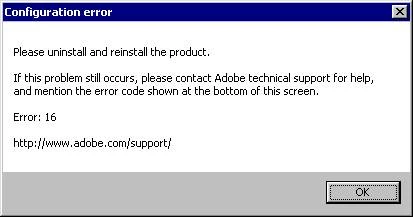
Error 16

  • October 16, 2015
  • 1 reply
  • 733 views

Just installed Robohelp 2016; it worked for one day, but now I am receiving this Error Message. Uninstalled and reinstalled but got same result;  has anyone else seen this??
This topic has been closed for replies.

1 reply

Peter Grainge
Community Expert
Community Expert
October 16, 2015

Try uninstalling with something like Wise 365 or similar. If that fails

then you will need to contact Adobe.

What operating system are you using.

Are the installation files on the same drive you are installing to?

Are you installing to your C drive?

Use the menu (bottom right) to mark the Best Answer or Highlight particularly useful replies. Found the answer elsewhere? Share it here.
hacknsmack4321_
Participating Frequently
October 16, 2015

We are on Windows 7 Enterprise; yes install files are on my desktop and are being installed to my C drive.

hacknsmack4321_
Participating Frequently
November 12, 2015

It's not a question of ordering different versions for use with and without admin rights. Admin rights are down to what your IT people set up for users. RoboHelp must be installed by a user with admin rights so IT could install with their logon and then ordinary user can log on. Alternatively IT can just give all the users admin rights.


See www.grainge.org for RoboHelp and Authoring tips

@petergrainge


Hmm, well it was installed by an IT person with admin rights, but when I tried to log in I always received an error message. So I’m confused as to what exactly our issue is. I think our solution may end up being admin rights for all users, as you suggest.

Thanks again – if we make any progress I will update my forum entry.
