Participating Frequently
April 12, 2011
Question

Error/crash when running script

  • April 12, 2011
  • 3 replies
  • 1371 views

When I run the Project Template Generator script I get the following error.  Can someone tell me what this is?
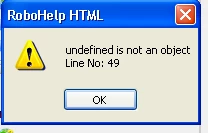
Thanks for your help!

    This topic has been closed for replies.

    3 replies

    Participating Frequently
    April 12, 2011

    I'm using RoboHelp 9.  It's called Project Template Generator.jsx.

    RoboColum_n_
    Legend
    April 12, 2011

    Yep. It runs fine for me. I assume you have a project open when you run it? Can you run any macro (e.g. Word Count)?


      The RoboColum(n)   @robocolumn   Colum McAndrew
    Participating Frequently
    April 18, 2011

    Hi,

    Extendscript is working fine on your machine. Project Template Generator script requires administrator rights as it tries to create template in program files folder area. For this reason please try to run RoboHTML in adminstrator mode. If you are using windows vista or windows 7, you can select run as administator by right clicking the RoboHTML shortcut. If you are running windows XP then you need adminstrator rights.

    Do let me know if this fixes the error on script running or not.

    Thanks

    Praful jain


    I hadn't had the time to update the thread, but this was indeed the problem!! Thank you for your reply.

    Participating Frequently
    April 12, 2011

    This is the code on line 49:

    RoboHelp.project.rename("Template.xpj");

    RoboColum_n_
    Legend
    April 12, 2011

    Without looking into the script code I'd second guess that there is an issue with it at line 49

    Are you referring to the Save As Project Template script? It runs OK for me. Was the script changed in any way before running it?


      The RoboColum(n)   @robocolumn   Colum McAndrew
    Participating Frequently
    April 12, 2011

    I didn't change anything. Just running it "out of the box". I don't know anything about scripting, so doubt whether I can decifer the problem myself by looking at the script.