
Known Participant
September 13, 2012
Question

Extra space in bullet lists

  • September 13, 2012
  • 1 reply
  • 1123 views

Hi,

First, I'm using RH9.  I'm having a problem with the way bulleted lists are appearing in Word (docx).

I've been trying all kinds of things to figure this out and this is my last hope!  I've tried to adjust the css file and that doesn't seem to help.  I didn't know if this is something that switching to RH10 would fix, I haven't tried that.

In RH9, I created a new blank project, added these into the First Topic and clicked the Bulleted Lists button.
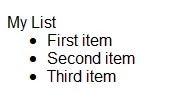
When I generate a Word (docx) document, my list appears with a lot of whitespace between the top of the list and the first item.
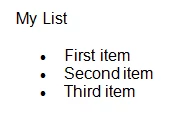
How can I get rid of the extra whitespace?  I use these a lot in my project and don't want to have to correct these manually.

Thanks,

Rene.

This topic has been closed for replies.

1 reply

Priyank Shrivastava.
Community Manager
Community Manager
September 13, 2012

Hi There,

Can you please double click on the Printed Document, and check where it is asking you to select the stylesheet. Select the actually CSS which is associated with the Topic and then generate the Doc.

Hope this helps.

Thanks

Priyank

Thanks, Priyank Shrivastava
Known Participant
September 13, 2012

It was set to "(None) Use the Project's CSS Styles", I changed it to "default.css" and there was no change.

I'm still getting the extra spacing?

Rene.

Priyank Shrivastava.
Community Manager
Community Manager
September 13, 2012

Can you create a blank project.

Add the bullets and do not make any change in the default.css. Generate the Doc and at last just change the Stylesheet to Default.css.

I have tested this with blank project and it worked.

Thanks

Priyank

Thanks, Priyank Shrivastava