Participant
July 25, 2023
질문

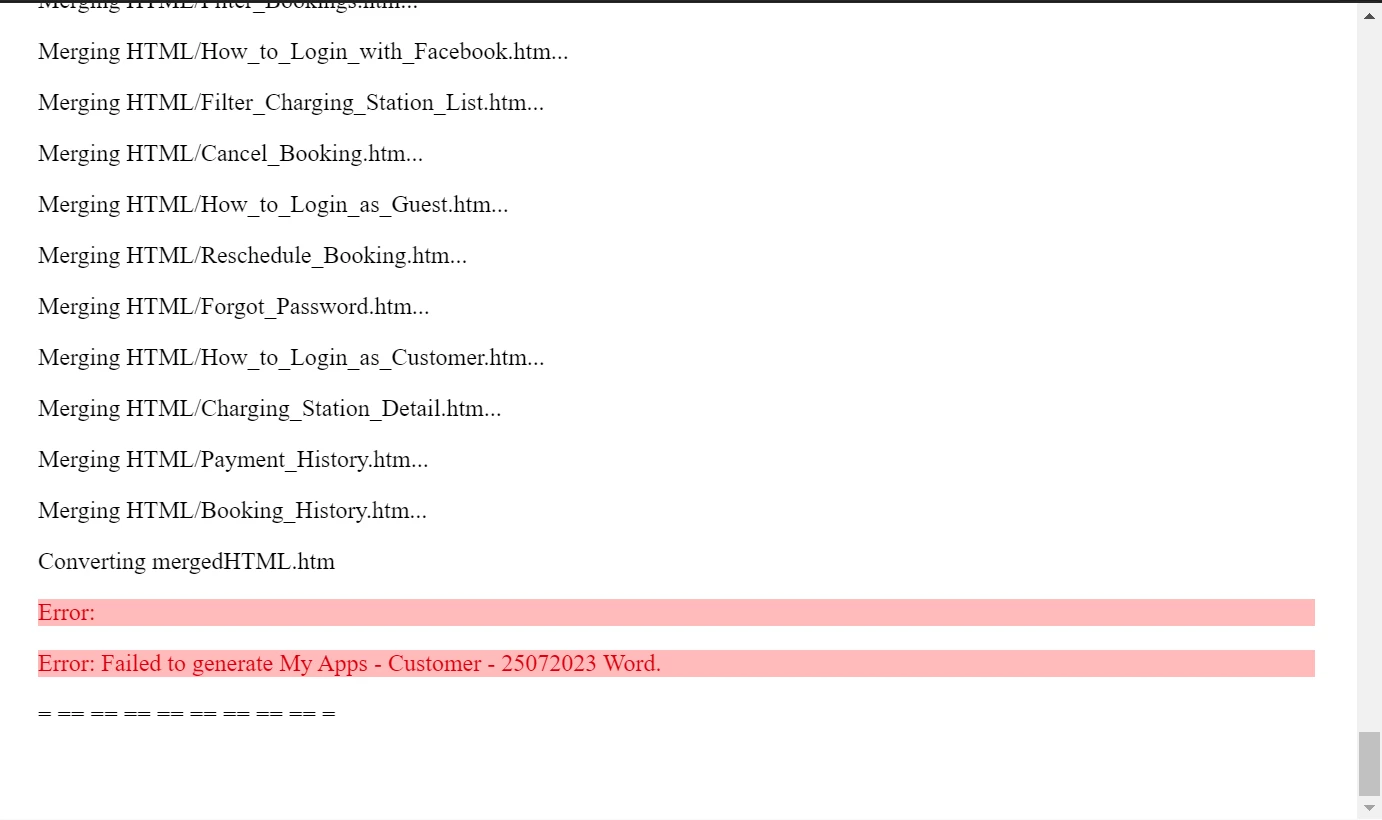
Failed when generated to Word

  • July 25, 2023
  • 4 답변들
  • 321 조회

Hi Everyone. 


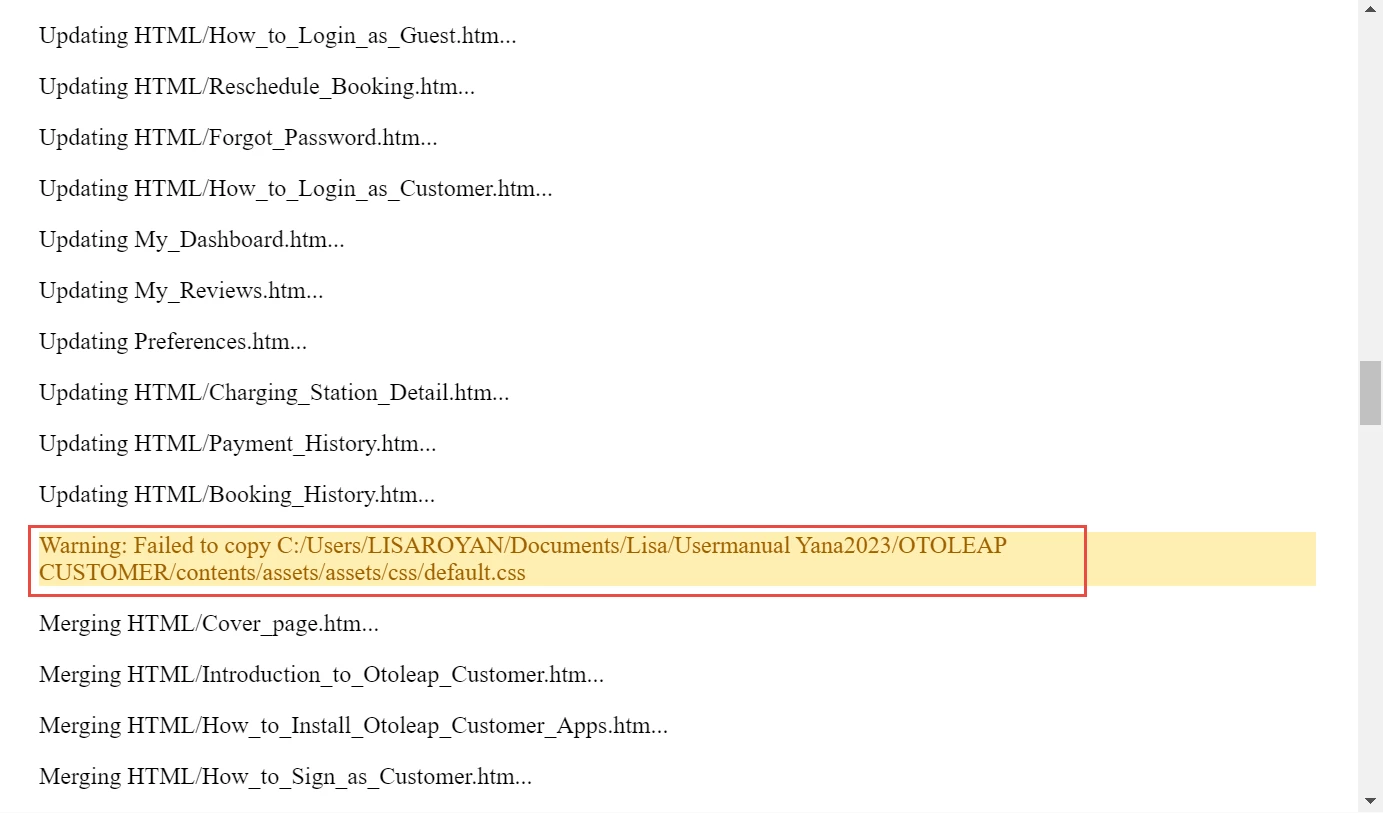
In RH 2020.8.34, when I try to generate Word output, I get the simple error message:  "Failed to generate [name of TOC]" and here's what I see when right-clicking the output preset:


Any advice for me?


Thank you!


    이 주제는 답변이 닫혔습니다.

    4 답변

    Community Expert
    July 25, 2023

    The yellow highlighted row indicates there is a topic pointing to "default.css" but something prevented the file from being copied (into the temporary directory used when building the word output, I think). Most likely is the path is wrong and that file doesn't exist in the specified location.


    Try the Reports > Broken Links report to see if the stylesheet appears. You can either browse for the correct file from the report (right-click > Replace link) or open the incorrect file and manually reapply there. (My guess is the problem file will be the one listed immediately before or after the error in the log.)


    I'm not sure that will fix error in red at the end of the report, but fixing it will rule out one possibility.


    Peter Grainge
    Community Expert
    Community Expert
    July 25, 2023

    What the link is to. 

    ________________________________________________________
    My site www.grainge.org includes many free Authoring and RoboHelp resources that may be of help.


    Use menu (bottom right) to mark as Best Answer or to Highlight particularly useful replies. Found the answer elsewhere? Share it here.
    Peter Grainge
    Community Expert
    Community Expert
    July 25, 2023

    You have to find the topic with the link that is pointing to your hard drive. In the topic the link will be a relative link so it will not show the full path that is in the error message, that is why I said to search on the end part of the string.


    Searching on Yana2023/OTOLEAP should find it. Then copy the target into your project.


    I don't understand why you are suggesting creating a folder.

    ________________________________________________________

    My site www.grainge.org includes many free Authoring and RoboHelp resources that may be of help.


    Use menu (bottom right) to mark as Best Answer or to Highlight particularly useful replies. Found the answer elsewhere? Share it here.
    Lisaroyan작성자
    Participant
    July 25, 2023

    sorry, I don't understand what you are referring to about the "target" 

    Peter Grainge
    Community Expert
    Community Expert
    July 25, 2023

    The warning in yellow is telling you that a topic has a link to something that is on your hard drive but not within the project. Search on part of the end of the string, not the whole link.

    ________________________________________________________

    My site www.grainge.org includes many free Authoring and RoboHelp resources that may be of help.


    Use menu (bottom right) to mark as Best Answer or to Highlight particularly useful replies. Found the answer elsewhere? Share it here.
    Peter Grainge
    Community Expert
    Community Expert
    July 25, 2023

    To add, users will not be able to access your hard drive so the link would fail.

    ________________________________________________________

    My site www.grainge.org includes many free Authoring and RoboHelp resources that may be of help.


    Use menu (bottom right) to mark as Best Answer or to Highlight particularly useful replies. Found the answer elsewhere? Share it here.