
FM 10 ignores Apply Page Break Marker filenames
Hi,
We're using Adobe TCS 3.5 (FM 10.0.1.408 and RH 9.0.1.262) to generate WebHelp from Frame.
We need to be able to specify the HTML file names for about 20% of our topics. I thought that maybe the "Apply Page Break Marker" feature might let us do this because it has a "Filename" field.
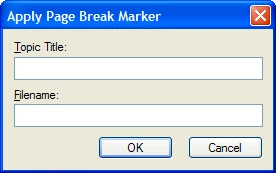
In Frame, I insert my cursor at the start of what I want to be a topic, I then choose RoboHelp>Apply Page Break Marker, which displays the above window. I specify the topic title, and Frame automatically populates the Filename field. However, because I want to specify my own file name, I select and revise the text that Frame put in the Filename field. Then I click OK and repeat the process for a bunch of topics. I save the document, update my Frame book, and then publish WebHelp.
However, when I look at the output folder, it does not contain HTM files with the names I entered in the Filename field.
It appears to have ignored what I put in the Filename field, opting instead to create its own file names, which are the topic titles with underscores for spaces.
Is there any way to use this feature to specify HTML file names?
SusanB
 AdChoices