
Nathan_Anderson
Participating Frequently
December 14, 2012
Answered

FrameMaker to RoboHelp remove Figure Captions

  • December 14, 2012
  • 2 replies
  • 2085 views

Software:

TCS 3.5: FM10 & RH9

Method A: 

When adding figures into paragraphs (figures that take up < 1/3 of the page width):

1. Place an Anchored Frame as "Run into Paragraph".

2. Draw a Text Frame slightly smaller than the anchored frame.

3. Change the Paragraph to "PlaceHolder".

4. Insert a "FigAnch" Table into the Text Frame.

5. Place an Anchored Frame as "Center" into the first row of the "FigAnch" table.

6. Provide a name for the caption.

Method B:

When adding figures below/above paragraphs (figures that take up > 1/3 of the page width):

1. One line below/above the current paragraph, set as "PlaceHolder".

2. Insert a "Fig" Table in the "PlaceHolder" paragraph.

3. Place an Anchored Frame as "Center" into the first row of the "Fig" table.

4. Provide a name for the caption.

Issue:

Both of the above methods work fine for auto-numbering when used as PDF output (1-1, 1-2, etc).

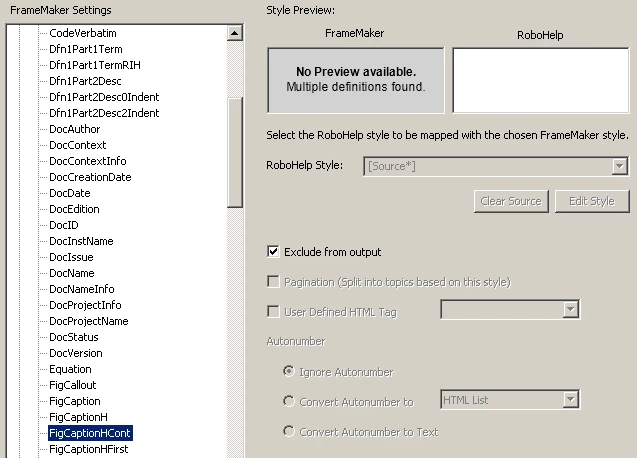
When I import the fm book into RoboHelp, only Method A causes the figure numbering to become "0-1" in all cases.  Method B works as expected (same as PDF output). I would really like to remove the figure numbers and captions completely when Linking my FM book to RH. Is this possible? I have tried checking the "Exclude From Output" for the FM Figure Caption paragraph styles, but it has no effect on the import.
Thanks,

Nathan

This topic has been closed for replies.
Correct answer Matt-Tech Comm Tools

Matt was kind enough to provide an open slot for some FM to RH traning yesterday. I train weather/meteorology software, and as with any software, it only does what you tell it to. Once I explained to Matt what I was trying to accomplish, he had a great way of explaining and teaching the "how and what" of the integration process. One of those processes was to create an FM to RH template for RH to use when linking my FM content into RH. Another was proper css mapping from FM to RH. I still have more to learn, but now I am rolling forward instead of scratching my head. FM to RH integration is a deep rabbit hole. You only get back what you put into it.  Thanks again, Matt! 


Thanks Nathan, I'm glad we could solve your problem.

For everyone else's benefit, the solution to the problem:

Nathan had an anchored frame, containing a table, containing a title. During the import process we were unable to ignore the autonumber on the table title in the anchored frame, though we were able to ignore the autonumber on the same paragraph tag when it was used outside of anchored frames.

Using a conversion template in the FrameMaker conversion settings, we were able to drop the autonumber from both of the title locations before RH ever got to the processing of the content.

-Matt

@mattrsullivan

2 replies

Jeff_Coatsworth
Community Expert
Community Expert
December 17, 2012

I don't quite understand what you're trying to do - if you mark some paragraph type as excluded, then it doesn't appear as a style in the RH project topic. Are you saying you're still seeing them appear?

Nathan_Anderson
Participating Frequently
December 17, 2012

Jeff,

" if you mark some paragraph type as excluded, then it doesn't appear as a style in the RH project topic. Are you saying you're still seeing them appear?"

That is exactly what is happening.  I only want the "Graphic" and not the label or number. The paragraph is not being excluded by RH when I have it "checked" to be excluded. I am not sure what to do about this issue.

If it helps, I can include my template *.fm file that I use for my chapters, which this issue is occuring on.

Thanks,

Nathan

Matt-Tech Comm Tools
Community Expert
Community Expert
December 17, 2012

Does the anchor appear in that paragraph? Perhaps that is keeping you from excluding the para.

-Matt Sullivan, FrameMaker Course Creator, Author, Trainer, Consultant
Arnis Gubins
Inspiring
December 17, 2012

Thread moved to the RoboHelp - FrameMaker Integration Forum.