

symmetricalMan
Inspiring
August 8, 2012
Question

Glossary Content Disappears from HTML Help (CHM)

  • August 8, 2012
  • 1 reply
  • 1045 views

Hi all,

Using Robohelp 8.0.2.208 on Windows 7 (64bit).

I've created a glossary, and upon compiling html help, when accepting the prompt to preview the compiled CHM I can see the glossary. No problems there.

However, if I close the CHM file, and then re-open it later (just from the directory I save it to, which is on my local machine), although the glossary tab appears, all the glossary terms are gone. In fact the whole glossary section is grey - there's a glossary tab, but no content or even a 'space' for the content - it's just a big grey section.
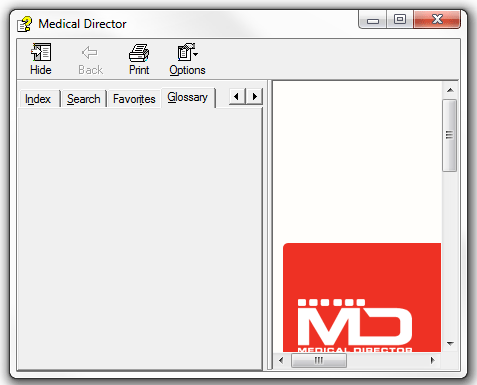
Any ideas?

This topic has been closed for replies.

1 reply

Captiv8r
Legend
August 8, 2012
symmetricalMan
Inspiring
August 8, 2012

Thanks Captiv8r, I think that's probably the issue and solution. Pity I'm not running RH9. Are you aware of a solution for RH8, or perhaps because it's not officially supported on 64-bit machines, I just have to suck it up?

EDIT:

I've done some more research and from what I understand, this 'browse sequence' issue I'm experiencing is (can be) resolved by registering a 64-bit version of the HHActiveX.dll. However, the 64-bit version is not supplied with RH8 32-bit (it seems that users with RH9 and above will have both the 32 and 64-bit versions, but no such luck for we RH8 32-bit users).

My next questions are;

  • Can the 64-bit version be registered on a system running RH8 32-bit?
  • Does this resolve the issue?

...and I guess I should ask where I could possibly get hold of the 64-bit version?

symmetricalMan
Inspiring
August 10, 2012

Hello again

You could download a trial version of 10, then just use the HHActiveX.dll that comes with it.

Just a thought... Rick

Helpful and Handy Links

RoboHelp Wish Form/Bug Reporting Form

Begin learning RoboHelp HTML 7, 8 or 9 within the day!

Adobe Certified RoboHelp HTML Training

SorcerStone Blog

RoboHelp eBooks


That was a neat idea, but unfortunately it didn't work. Thanks anyhow.

EDIT: Here's something really weird...

My computer runs Windows 7 64-bit. On it I have de-registered the old RH8 DLL, and registered the new RH10 DLL that I downloaded. Hold that thought.

On my local computer I have Virtual Machine installed, and with it I have a 32-bit version of Windows 7.

So, I installed RH10 into the VM image, dragged one of my projects into it, opened it in RH10, and upgraded it to the RH10 format when prompted.

I compiled a CHM, and upon opening it (I closed RH first) I have a fully-functional glossary tab (as one would expect from having used RH10).

However, if I take that new CHM file and drag it out of the VM image, dropping it back into my 'actual' local computer, upon opening the CHM, the glossary is greyed-out again. HUH?!