
February 21, 2012
Answered

Glossary tab not appearing in RoboHelp9

  • February 21, 2012
  • 1 reply
  • 1420 views

Yes, I have read the other posts on this topic, but am still having the problem.

I have a RoboHelp project, with a glossary, that I've published to several layouts.  The glossary appears in the web layouts (but, for some reason does not work in Chrome), AIR, and even in the printed documentation.  In MS HTML Help, however, I don't even get a glossary tab.  I have RoboHelp 9 installed, and I've manually re-registered HHActiveX.dll.  In the MS HTML Help layout properties, I've selected both <Default Glossary>, and the project name (the only other option provided).  Either way - no glossary.

I've triex everything I've read, but still don't even get the tab.  What am I missing?

Specs:

RoboHelp 9

Windows XP Pro, 32-bit
This topic has been closed for replies.
Correct answer Peter Grainge

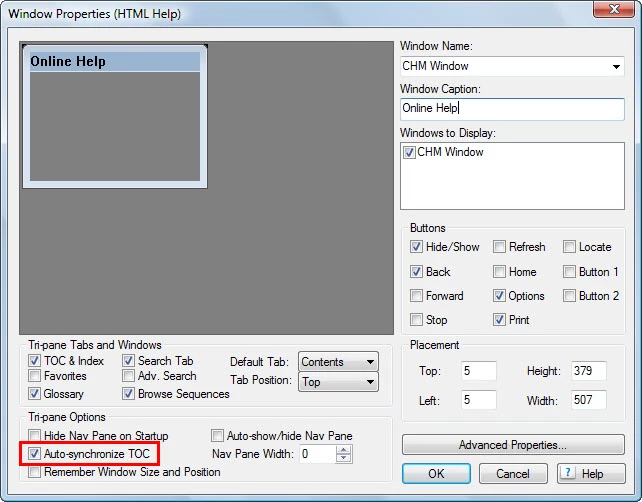
Ignore the highlighting in this screenshot. This is where you enable to glossary tab that Rick is referring to.

MS HTML help must be the default layout when you create the window.


See www.grainge.org for RoboHelp and Authoring tips

@petergrainge

1 reply

Captiv8r
Legend
February 21, 2012

Welcome to our community

Did you try creating a new Window definition and specifying that it has the Glossary enabled?

Cheers... Rick

Helpful and Handy Links

RoboHelp Wish Form/Bug Reporting Form

Begin learning RoboHelp HTML 7, 8 or 9 within the day!

Adobe Certified RoboHelp HTML Training

SorcerStone Blog

RoboHelp eBooks

Peter Grainge
Community Expert
Peter GraingeCommunity ExpertCorrect answer
Community Expert
February 21, 2012

Ignore the highlighting in this screenshot. This is where you enable to glossary tab that Rick is referring to.

MS HTML help must be the default layout when you create the window.


See www.grainge.org for RoboHelp and Authoring tips

@petergrainge

Use the menu (bottom right) to mark the Best Answer or Highlight particularly useful replies. Found the answer elsewhere? Share it here.
February 21, 2012

Thanks, Peter - your picture helped a lot!  Mainly, because it didn't look like the window I had just created.  Going back, it turned out that that window was for WebHelp Pro.  I have HTML Help set as my default layout.  I don't even have WebHelp Pro set as a batch publish option, so have no idea why, when I created a new window, it created one like that.

Oddly, I created a few new windows.  Sometimes they are HTML Help widows, and sometimes WebHelp Pro.  Any ideas why that would happen?

At any rate, I tried the new window, and now have a glossary.  Thanks!

Off topic, thanks, too, for your site - I have used it several times for help.

For what it's worth, I used to be a RoboHelp beta tester.  No, not for RoboHelp 9, or 8, or, as far as I can remember, any number.  I was a beta tester for RoboHelp and RoboDemo back when they were still part of eHelp (2002-2004).  They've changed a bit since then!