
February 21, 2012
Answered

Glossary tab not appearing in RoboHelp9

  • February 21, 2012
  • 1 reply
  • 1420 views

Yes, I have read the other posts on this topic, but am still having the problem.

I have a RoboHelp project, with a glossary, that I've published to several layouts.  The glossary appears in the web layouts (but, for some reason does not work in Chrome), AIR, and even in the printed documentation.  In MS HTML Help, however, I don't even get a glossary tab.  I have RoboHelp 9 installed, and I've manually re-registered HHActiveX.dll.  In the MS HTML Help layout properties, I've selected both <Default Glossary>, and the project name (the only other option provided).  Either way - no glossary.

I've triex everything I've read, but still don't even get the tab.  What am I missing?

Specs:

RoboHelp 9

Windows XP Pro, 32-bit
This topic has been closed for replies.
Correct answer Peter Grainge

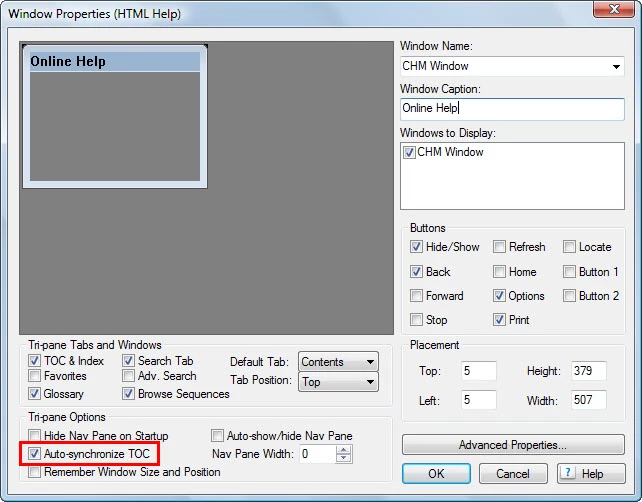
Ignore the highlighting in this screenshot. This is where you enable to glossary tab that Rick is referring to.

MS HTML help must be the default layout when you create the window.


See www.grainge.org for RoboHelp and Authoring tips

@petergrainge

1 reply

Captiv8r
Legend
February 21, 2012

Welcome to our community

Did you try creating a new Window definition and specifying that it has the Glossary enabled?

Cheers... Rick

Helpful and Handy Links

RoboHelp Wish Form/Bug Reporting Form

Begin learning RoboHelp HTML 7, 8 or 9 within the day!

Adobe Certified RoboHelp HTML Training

SorcerStone Blog

RoboHelp eBooks

Peter Grainge
Community Expert
Peter GraingeCommunity ExpertCorrect answer
Community Expert
February 21, 2012

Ignore the highlighting in this screenshot. This is where you enable to glossary tab that Rick is referring to.

MS HTML help must be the default layout when you create the window.


See www.grainge.org for RoboHelp and Authoring tips

@petergrainge

Use the menu (bottom right) to mark the Best Answer or Highlight particularly useful replies. Found the answer elsewhere? Share it here.
Captiv8r
Legend
February 21, 2012

"I you didn't set the default SSL to WebHelp Pro, maybe someone else did?"  As I'm the only one using this system, I sure hope not!  Actually, when I saw Peter's reply, I did check, and HTML Help was set as the default, so I don't know how that window got generated.

As for telling Adobe about this enhancement, I'm not going to touch that!  If someone of Peter's stature wasn't able to convince them of something so obvious, one more voice won't help.  Yes, I know that sounde defeatest, but my interactions with Adobe have not been, shall we say, encouraging.  In one recent example, they used bait-and-switch advertising on their web site.  Sure, it could have been a typo, but I told their customer service and sales groups about the problem every week for a month.  I then called their corporate legal department in California, who also did nothing.  I then decided to let the California attorney general's office know about it and, voila, Adobe fixed the problem!  (No, I'm not suing them!).  This was just one experience; with the others, I don't think I'll waste my time telling them about default windows.


BBYAPIs wrote:

...If someone of Peter's stature wasn't able to convince them of something so obvious, one more voice won't help....

Indeed Peter has a voice with Adobe. But guess what? His is but one voice. Only by folks peppering Adobe with Bug Reports/Wish Forms will they truly take notice.

Cheers... Rick

Helpful and Handy Links

RoboHelp Wish Form/Bug Reporting Form

Begin learning RoboHelp HTML 7, 8 or 9 within the day!

Adobe Certified RoboHelp HTML Training

SorcerStone Blog

RoboHelp eBooks