
Known Participant
August 1, 2012
Question

How can we have Topic tittle and File name different?

  • August 1, 2012
  • 1 reply
  • 1578 views

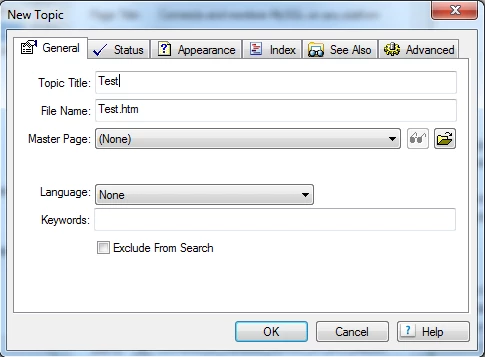
How can we have Topic tittle and File name different? I am new to Robohelp i want to have the topic tittle in TOC and File name diffferent.

Example Topic tittle: Testing

                File name: Testing for adobe

Do we have any option to do this? Because in General tab it we type the Topic tittle it automatically takes the same for File name.
This topic has been closed for replies.

1 reply

Peter Grainge
Community Expert
Community Expert
August 1, 2012

When you type in the topic title, RoboHelp automatically enters the same string in the filename field.

All you have to do is click in the filename field and change it.

Note, when creating a topic, if you then go back and change the title, RoboHelp will use that as the default again but you can edit again.

Thereafter, when you make changes they are independent.


See www.grainge.org for RoboHelp and Authoring tips

@petergrainge

Use the menu (bottom right) to mark the Best Answer or Highlight particularly useful replies. Found the answer elsewhere? Share it here.
Known Participant
August 1, 2012

Thanks that helped. But how can we change file names for existing topic tittle?

Peter Grainge
Community Expert
Community Expert
August 1, 2012

@ RoboColum(n) i want to change HTML file names with existing topic tittle only. Not the project name.


That is what I have told you how to do. Do you maybe mean the Topic Heading shown at the top of each topic? If so, that defaults from the Topic Title but can be changed to anything else.

If we still have not understood you, please show us what you want with an image.


See www.grainge.org for RoboHelp and Authoring tips

@petergrainge

Use the menu (bottom right) to mark the Best Answer or Highlight particularly useful replies. Found the answer elsewhere? Share it here.