
August 21, 2012
Answered

How to add search tab in the .chm file
  • August 21, 2012
  • 1 reply
  • 1103 views

Hi All,

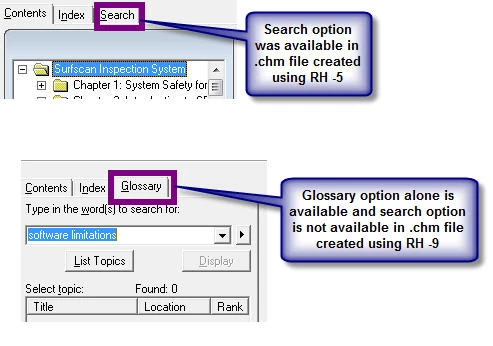
All these days, I was using RH -5 to create the .chm file. Today, I moved onto RH -9. The chm file had the Search option enabled automatically in RH-5. But in RH-9, Glossary option alone is available and I am not able to add Search tab adjacent to the Index tab. Please refer to the screenshot for more clarification.

Please help me to solve this as the client would expect Search tab for sure.

Regards,

Lata

This topic has been closed for replies.
Correct answer Captiv8r

Hi Lata

What you are showing in your image is a mismatch. The tab says Glossary but the contents of the tab show Search.

I think in this case I would suggest attempting to define a new window with the attributes you need. Then configure that window as the default for the layout you are using.

You define the window by:

1. Ensure Microsoft HTML Help is the default layout.

2. Click View > Pods > Project Set-up and you should see the windows there.

Cheers... Rick

Helpful and Handy Links

RoboHelp Wish Form/Bug Reporting Form

Begin learning RoboHelp HTML 7, 8 or 9 within the day!

Adobe Certified RoboHelp HTML Training

SorcerStone Blog

RoboHelp eBooks

1 reply

Captiv8r
Captiv8rCorrect answer
Legend
August 21, 2012

Hi Lata

What you are showing in your image is a mismatch. The tab says Glossary but the contents of the tab show Search.

I think in this case I would suggest attempting to define a new window with the attributes you need. Then configure that window as the default for the layout you are using.

You define the window by:

1. Ensure Microsoft HTML Help is the default layout.

2. Click View > Pods > Project Set-up and you should see the windows there.

Cheers... Rick

Helpful and Handy Links

RoboHelp Wish Form/Bug Reporting Form

Begin learning RoboHelp HTML 7, 8 or 9 within the day!

Adobe Certified RoboHelp HTML Training

SorcerStone Blog

RoboHelp eBooks

August 22, 2012

Thanks Rick. I created a new window with the required attributes.