
Legend
November 21, 2012
Question

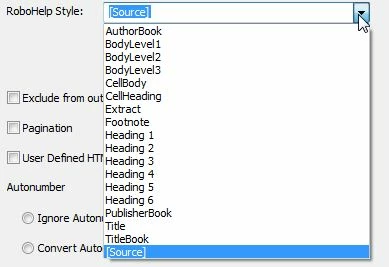
How to add styles to the standard Robohelp Style list?

  • November 21, 2012
  • 1 reply
  • 1230 views

Hi

I want to create a Robohelp style with some border and shading under the standard Robohelp Style list (refer screenshot) so that I can use it to assign to a paragraph while importing my FrameMaker file.

How do I that?
Cheers

Sreekanth

This topic has been closed for replies.

1 reply

Jeff_Coatsworth
Community Expert
Community Expert
November 21, 2012

Go into RH and create your new style, then use the Conversion Settings screen to map the FM paragraph type to the new RH style.

Legend
November 21, 2012

I tried that.  I created a new blank project in which I had default.css. I edited this css and created the required new style within that.

But when I try to import a FrameMaker book onto that project, RHStyleMapping.css is considered in the Import dialog box, and not the default.css which has my new style.

So, what is the workaround?

Legend
November 21, 2012

You can browse to select any css you've got set up for the mapping - you're not locked into using RHStyleMapping.css


In my case, it is grayed out.  See screenshot below.