Exit
  • Global community
    • Language:
      • Deutsch
      • English
      • Español
      • Français
      • Português
  • 日本語コミュニティ
  • 한국 커뮤니티
0

How to change the highlight color for active topic in TOC?

Guest
Oct 23, 2015 Oct 23, 2015

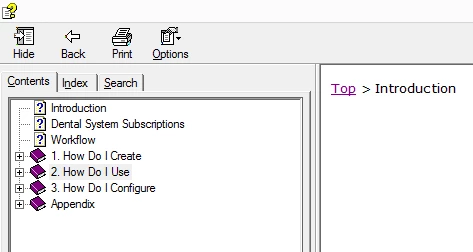
The highlight color of active topic is light grey and poorly visible, as you can see on screenshot. i need to make it darker.

Thanks for help in advance)
scr.png

329
Translate
Report
Community guidelines
Be kind and respectful, give credit to the original source of content, and search for duplicates before posting. Learn more
community guidelines
LEGEND ,
Oct 23, 2015 Oct 23, 2015
LATEST

Hi there

To my knowledge there isn't a place in RoboHelp that allows you to set that color.

To my knowledge, the CHM viewer simply uses the colors defined in the Microsoft Windows operating system. For me, on my Windows 7 Pro setup, if I right-click the desktop and choose to Personalize, then click Window Color followed by Advanced appearance settings. The Windows Item that seems to control this is "Selected Items".

tmp1.png

LOL, now to try and sort what mine was before experimenting!

Cheers... Rick

Translate
Report
Community guidelines
Be kind and respectful, give credit to the original source of content, and search for duplicates before posting. Learn more
community guidelines
Resources
RoboHelp Documentation
Download Adobe RoboHelp
