
Inspiring
July 26, 2017
Answered

How to control fomatting used on WebHelp Index tab?

  • July 26, 2017
  • 2 replies
  • 1577 views

Hi all,

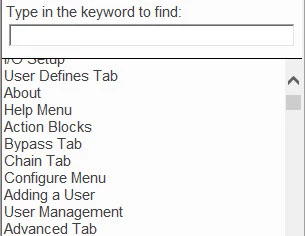
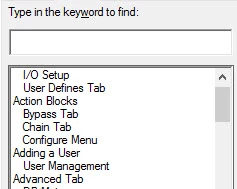
I'm using RoboHelp HTML 2015. I'm generating using a customized WebHelp layout and converting to a CHM, but the index is not indenting the sub-entries. The index does not appear to be in alphabetical order (even though it is). I have tried outputting to different WebHelp skins (WebHelp and CHM converted to WebHelp) and they all have this problem unless I select Pure HTML. I 'd prefer to use DHTML > Pure HTML to keep the Synch TOC and Search Box in Toolbar options. The same index in CHM files not converted from WebHelp and HTML5 output looks as it should. How can I control the way the index entries and sub-entries appear in WebHelp?

WebHelp with the incorrect index formatting:
CHM with correct index formatting:
Bonus question: At least one of my index entries shows a popup when you select it. None of the other entries do this. How can I avoid this popup from appearing on any of my entries?

This topic has been closed for replies.
Correct answer Scott McC

I am not 100% sure but I don't think an uninstall removes edited files.

Couple that with the possibility that you have missed something and that

could be why a reinstall is not fixing things.

Can you install on another PC that will has not been used for RoboHelp?


That's exactly what was happening. The modified files were left in the directory after the uninstall and reinstall. After I removed those files, the reinstall worked and the index is properly indented.

Thanks for helping me fix a user error!

Scott

2 replies

Captiv8r
Legend
July 26, 2017

Hi there

I believe Jeff is spot on with regards to the popup.

As for the sorting, you have two options for index. Binary and non-Binary. You might first try right-clicking the index in RoboHelp and see if it offers you a sort option.

Assuming it's available (note that in my image, it isn't) Then you may need to sort it.

If the option is NOT available and you want to enable it. Take the following steps.

Nominate a Single Source Layout of the Microsoft HTML Help type. Then clear the Binary Index option.

Binary Index is controlled by opening the Project Settings.

Cheers... Rick

Scott McCAuthor
Inspiring
July 27, 2017

Rick,

Thanks for the suggestion. I tried turning off the binary index, sorting the index, even using the smart index wizard. No luck on any of those. I still have the problem of WebHelp output using DHTML > Pure HTML not indenting the index sub-entries. I believe the file "whihost.js" controls the index, but I have no idea what I need to change to make this work correctly. Can anyone point me in the right direction?

Thanks in advance.

Scott

Scott McCAuthor
Inspiring
July 27, 2017

Try creating a new layout, not a copy.

Peter Grainge

www.grainge.org

@petergrainge


I created a new WebHelp layout and didn't change any of the settings. I generated the project and selected View Results. I selected the Index and everything initially appears to be indenting correctly (the first picture)...until I click the Allow blocked content button (the second picture).

Jeff_Coatsworth
Community Expert
Community Expert
July 26, 2017

Not sure about your sorting issue, but I think your popup happens when you have multiple topics tagged with the same index term.

Scott McCAuthor
Inspiring
July 26, 2017

Thanks, Jeff. I had two topics with the same index entries. I no longer have the popups once I corrected those entries.

Now on to the problem with the index formatting!