
Inspiring
August 7, 2013
Question

How to make text stop wrapping around an image?

  • August 7, 2013
  • 1 reply
  • 1314 views

Hello:

I am using RoboHelp HTML 10 on Windows 7, generating PDF and webhelp.

My project includes some images with text wrapping to the right of the image. I would like to allow a certain amount of the text to appear next to the image, then force the wrapping to stop at a specific sentence. I want the next paragraph to be aligned with the left margin instead of continuing to wrap around the image.

This is the effect I want:
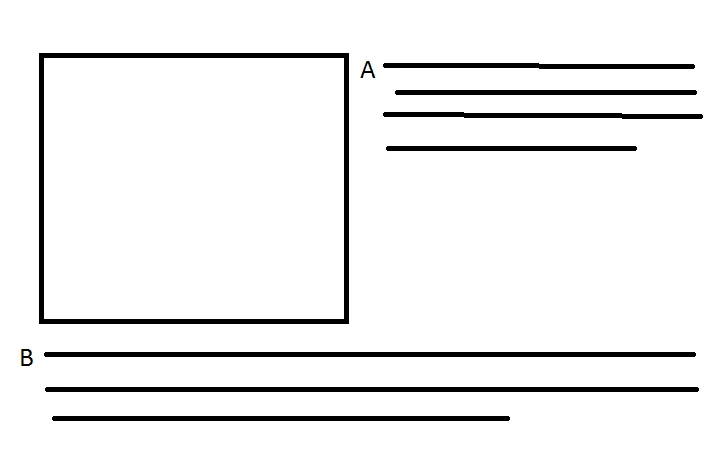
I want paragraph A to appear next to the image, and paragaph B to be aligned with the left edge of the topic. It is OK for there to be some white space below paragraph A.

Is there a way to make this happen?

Regards,
Juliette Curtis

This topic has been closed for replies.

1 reply

Peter Grainge
Community Expert
Community Expert
August 7, 2013

Rh10 has a new item in the Style Dropdown in the Style Pod. There you can create styles that you apply to images to do just what you have described.

You have to select the image and then apply the style.


See www.grainge.org for RoboHelp and Authoring tips

@petergrainge

Use the menu (bottom right) to mark the Best Answer or Highlight particularly useful replies. Found the answer elsewhere? Share it here.
Inspiring
August 7, 2013

Thanks for the quick reply Peter.

I was able to create an image style that makes the text wrap to the right of the image. However, I can't work out how to make the text stop wrapping in a specific place. This image shows what is happening:

I want to allow paragraph A to appear to the right of the image and force B to appear below the image, as shown in the first image. The problem is that I don't know how to make B do what I want. Is there a way to do this?

Thanks again for your help.

Regards,

Juliette

Captiv8r
Legend
January 8, 2014

Hi Rick,

I also have this problem so I followed your table advice. It's actually a brilliant idea and working great on PDF and CHM, but when I printed the PDF, the vertical grid (a white line) on my second column (just have two columns, shaded red, btw) shows. Is there a way to correct this? Thanks!


Hi there

I'll have to defer to my dear friend Peter. He's the print guru. Personally, I have a propensity for not killing trees and believe on-line help should be exactly that.

So perhaps Peter will have a suggestion here.

Cheers... Rick