Exit
  • Global community
    • Language:
      • Deutsch
      • English
      • Español
      • Français
      • Português
  • 日本語コミュニティ
  • 한국 커뮤니티
0

I have added a hyperlink which is a .mp4 video file but it won't run when I generate the document.

New Here ,
Nov 11, 2015 Nov 11, 2015

I have added a hyperlink which is a .mp4 video file but it won't run when I generate the document.

1.6K
Translate
Report
Community guidelines
Be kind and respectful, give credit to the original source of content, and search for duplicates before posting. Learn more
community guidelines

correct answers 1 Correct answer

LEGEND , Nov 12, 2015 Nov 12, 2015

Hi there

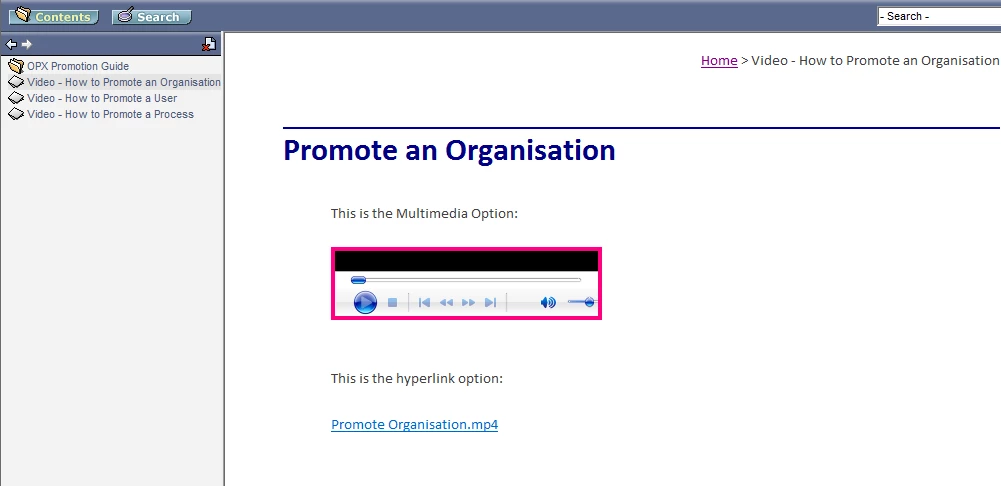
Are you using the WebHelp to CHM converter script? If so, that screen shot may make sense. If not, that's not CHM output.

Translate
LEGEND ,
Nov 11, 2015 Nov 11, 2015

Which version of RoboHelp? And how did you create the link? Is the MP4 a baggage file? What are you seeing in the output?

Translate
Report
Community guidelines
Be kind and respectful, give credit to the original source of content, and search for duplicates before posting. Learn more
community guidelines
New Here ,
Nov 11, 2015 Nov 11, 2015

I'm using RoboHelp 2015 and I've generated a WebHelp Pro user guide. I clicked on Insert Hyperlink and selected .mp4 file from the SSL folder. 

Translate
Report
Community guidelines
Be kind and respectful, give credit to the original source of content, and search for duplicates before posting. Learn more
community guidelines
LEGEND ,
Nov 11, 2015 Nov 11, 2015

Hi there

Do you also use the RoboHelp Server counterpart? If not, you need to switch to another output type because WebHelp Pro is only for use with that.

Cheers... Rick

Translate
Report
Community guidelines
Be kind and respectful, give credit to the original source of content, and search for duplicates before posting. Learn more
community guidelines
New Here ,
Nov 11, 2015 Nov 11, 2015

Thank you for that - I’ve also tried to save the output as a .CHM file and the video will not run using this output type.

Translate
Report
Community guidelines
Be kind and respectful, give credit to the original source of content, and search for duplicates before posting. Learn more
community guidelines
New Here ,
Nov 11, 2015 Nov 11, 2015

I'm also running RoboHelp 2015 locally on my C Drive.

Translate
Report
Community guidelines
Be kind and respectful, give credit to the original source of content, and search for duplicates before posting. Learn more
community guidelines
LEGEND ,
Nov 11, 2015 Nov 11, 2015

You don't want to create a hyperlink, unless you can link to Youtube or another online solution. In your case, embed the MP4 so that it can play inside your help. Make sure you have patch 1 installed and then follow the steps outlined on: https://www.wvanweelden.eu/blog/2015/10/24/adobe-robohelp-2015-embedding-multimedia-camtasia-studio

Translate
Report
Community guidelines
Be kind and respectful, give credit to the original source of content, and search for duplicates before posting. Learn more
community guidelines
New Here ,
Nov 12, 2015 Nov 12, 2015

Thanks for that William however, adding a Multimedia option doesn't work. I've attached a screenshot and hope this helps. This is the .CHM file output.PromoteOrganisation.png
Translate
Report
Community guidelines
Be kind and respectful, give credit to the original source of content, and search for duplicates before posting. Learn more
community guidelines
LEGEND ,
Nov 12, 2015 Nov 12, 2015

Hi there

Are you using the WebHelp to CHM converter script? If so, that screen shot may make sense. If not, that's not CHM output.

Translate
Report
Community guidelines
Be kind and respectful, give credit to the original source of content, and search for duplicates before posting. Learn more
community guidelines
New Here ,
Nov 13, 2015 Nov 13, 2015
LATEST

Yes

Translate
Report
Community guidelines
Be kind and respectful, give credit to the original source of content, and search for duplicates before posting. Learn more
community guidelines
Resources
RoboHelp Documentation
Download Adobe RoboHelp