
Inspiring
April 23, 2012
Answered

icon legend for RoboHelp HTML?

  • April 23, 2012
  • 2 replies
  • 1805 views

Greetings, am evaluating RH9 to decide if it's a worthwhile purchase and am having a lot of difficulties in getting up and running.

After this long intro, the two questions for today are: is there an icon legend somewhere to be found?

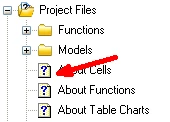
I've got question marks on topics (imported a Word doc to create a project), and have no idea what they represent and what I should be doing to normalize the topics to be without these question marks.

Also, tried yesterday to import an HTML document with a lot of DIV sections (11 pages) and no topics were created in RoboHelp HTML. What would be the correct way to import it so that each DIV is a separate topic?

I'd really appreciate help in getting something working.

Many thanks, Donna
This topic has been closed for replies.
Correct answer RoboColum_n_

Are you referring to these icons?

If so, this is the standard RH topic icon.

2 replies

RoboColum_n_
RoboColum_n_Correct answer
Legend
April 23, 2012

Are you referring to these icons?

If so, this is the standard RH topic icon.

udonnaAuthor
Inspiring
April 23, 2012

Exactly!  --So the question mark doesn't indicate that something needs to be fixed?

Peter Grainge
Community Expert
Community Expert
April 23, 2012

As Colum says, that is the standard topic icon and does not indicate anything. It is used by many authoring tools.

I see I misread your original question on the importing aspect. You had started with reference to a Word document so your reference to Pages caught me out. Also I have been working with Word all morning so have some pity on me!

Pages in an HTML file?

You can force Word documents to come in breaking on whatever style you set to paginate. (Explained on my site) There is no equivalent option for HTML but the content should display. Is it a file you can send me offline? If so see the Contact page on my site. It's OK to attach the HTM file to an email.


See www.grainge.org for RoboHelp and Authoring tips

@petergrainge

Use the menu (bottom right) to mark the Best Answer or Highlight particularly useful replies. Found the answer elsewhere? Share it here.
Peter Grainge
Community Expert
Community Expert
April 23, 2012

Donna

Welcome to the forum.

When replying there is a camera icon that allows you to include screenshots in your post. Seeing what you are seeing would help.

Take a look at the importing pages on my site. That will address some of your questions. In the process it may fix some of the issues. Try that and then post back with whatever problems remain, hopefully none.


See www.grainge.org for RoboHelp and Authoring tips

@petergrainge

Use the menu (bottom right) to mark the Best Answer or Highlight particularly useful replies. Found the answer elsewhere? Share it here.