
Legend
December 16, 2012
Answered

Images in gallery not appearing while mapping

  • December 16, 2012
  • 1 reply
  • 768 views

Hi

I created a Settings.isf file to import FM 11 file into RH10. During this process, I created a paragraph style (Example style), with a pattern image linked to a custom icon I had placed in the Symbols folder of the default Gallery folder (See image below).
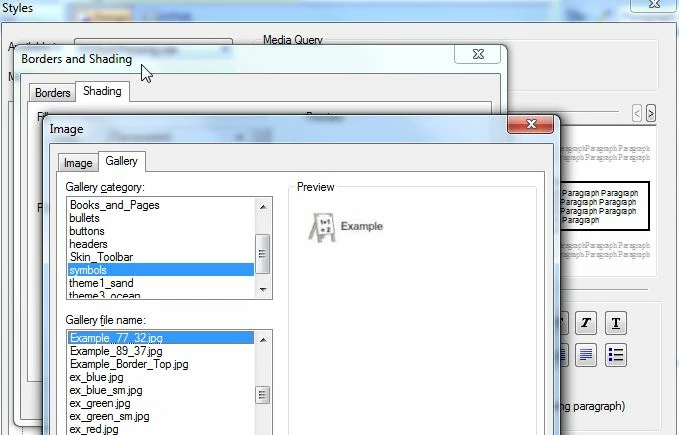
After saving my Settings file, when I try to import and map the relevant FM paragraph to this style, I don't see the icon. All other formatting I had defined are retained, except this icon.

Am I placing the images in the wrong location? Or should I change the path? Where am I going wrong?

Please guide.

Sreekanth

This topic has been closed for replies.
Correct answer Matt-Tech Comm Tools

I believe Jeff is correct...you need to modify your CSS in RH to accomplish this.

In most cases, you could change the HTML to conform to your current CSS, but since you're linking to the FM files, you'll need to look at the HTML generated by the link files and modify the CSS to conform to the HTML.

If you change your mappings to the RH process, review the generated HTML and modify the CSS as needed.

1 reply

Jeff_Coatsworth
Community Expert
Community Expert
December 17, 2012

I'm still trying to figure out if this an integration question or not - you've created a style in RH that has a custom image associated with it, right? If you create a new blank project and use the Example style, does your image appear? If it doesn't then your problem doesn't have anything to do with FM to RH integration; it's something to do with RH styles.

Matt-Tech Comm Tools
Community Expert
Matt-Tech Comm ToolsCommunity ExpertCorrect answer
Community Expert
December 17, 2012

I believe Jeff is correct...you need to modify your CSS in RH to accomplish this.

In most cases, you could change the HTML to conform to your current CSS, but since you're linking to the FM files, you'll need to look at the HTML generated by the link files and modify the CSS to conform to the HTML.

If you change your mappings to the RH process, review the generated HTML and modify the CSS as needed.

-Matt Sullivan, FrameMaker Course Creator, Author, Trainer, Consultant
Legend
December 17, 2012

Hi

I posted this is FrameMaker integration as I wasn't finding the images during the mapping phase.

I tried the approach Matt suggested. Here is what I did:

  1. Publish the project as a WebHelp output.
  2. Copy the Example icon to the WebHelp folder.
  3. Edited the RHStyleMapping.css file and add the code "background-image: url(Example.png)" as the last line of Example style.
  4. Launch the project.

The image is visible now.

Thanks a ton, Matt.