
Participating Frequently
February 11, 2015
Question

Importing a RoboHelp for Word project results in carnage

  • February 11, 2015
  • 1 reply
  • 410 views

Hi,

Using a newly installed version of RoboHelp v11, I find that there's no 'RoboHelp for Word' any more, so I thought I'd import my 'RoboHelp for Word' projects into 'RoboHelp HTML'. I last edited these projects in 'RoboHelp for Word' v9.

Using default settings, the import completes but:

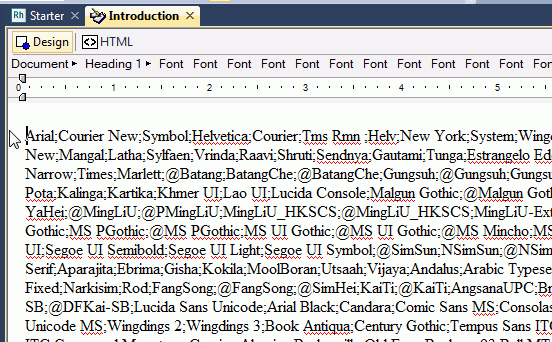
  • the first topic is preceded by page of nonsense font codes:
  • very few of the embedded, contents or index hyperlinks;

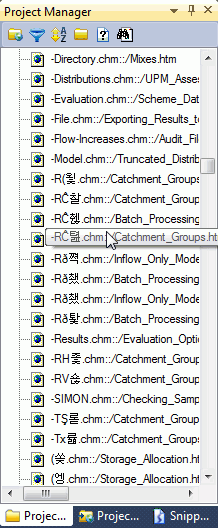
  • the 'URL' entries in the project manager are mostly garbage, and look as though there's some sort of Unicode issue.
Is there a guide somewhere for the average idiot like me as to how to reliably import old 'RoboHelp for Word' projects?

Thanks for any advice.

Trevor Cooper

    This topic has been closed for replies.

    1 reply

    Captiv8r
    Legend
    February 11, 2015

    Hi there

    When you used RoboHelp for Word, what was your output type? You might find you have better luck using different files. But before we can say what those files are, we need to know the output. From what I'm seeing, I'm suspecting CHM. But I'm not sure.

    Cheers... Rick

    torebaAuthor
    Participating Frequently
    February 11, 2015

    Rick!

    Yes, you're absolutely right, .chm.

    What does that suggest then?

    Cheers

    TC

    Peter Grainge
    Community Expert
    Community Expert
    February 24, 2015

    Rick, Willam,

    Thanks for your advice. But does anyone understand why RoboHelp v11 is so useless at opening projects from RoboHelp for Word v9? Is it such an outrageous thing to want to do? I would have thought not, given that there's no longer a RoboHelp for Word in the latest version...

    Regards

    Trevor Cooper


    Two links that might help here.

    See Item 8 in Snippets on my site. It is a How To for your scenario that was written by someone who had the same problem but in a much older version than you have. Nonetheless it might still help.

    See Item 5 in Snippets for what appears to be the font list problem you are seeing.

    (The links are to different areas of the Snippets page).


    See www.grainge.org for RoboHelp and Authoring tips

    @petergrainge

    Use the menu (bottom right) to mark the Best Answer or Highlight particularly useful replies. Found the answer elsewhere? Share it here.