
Exit
  • Global community
    • Language:
      • Deutsch
      • English
      • Español
      • Français
      • Português
  • 日本語コミュニティ
  • 한국 커뮤니티
0

Incomplete Keyword Highlights

New Here ,
Oct 04, 2017 Oct 04, 2017

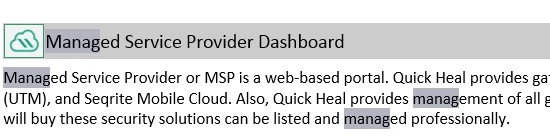
When I search for a keyword, the search result shows incomplete keywords selected. For example, if I type the word 'site', in the search result, only the letters 'sit' are highlighted. If I type 'managed', it highlights 'manag' only. What is the logic behind such search result. If there is any solution to it.IncompleteSearchKeyWords.jpg
268
Translate
Report
Community guidelines
Be kind and respectful, give credit to the original source of content, and search for duplicates before posting. Learn more
community guidelines
Community Expert ,
Oct 04, 2017 Oct 04, 2017

I wouldn't say there was any logic to it! It is a known bug that has been reported to Adobe and one that I am following.

There is no workaround but the same problem does not occur with the responsive layouts if you are using RoboHelp 2015 or 2017. Maybe you could switch to one of those? It will affect calls to the help so check with your developers before changing.

Please see the Sticky Topics and always start a thread with your version of RoboHelp. Helps get better replies.


See www.grainge.org for RoboHelp and Authoring information

@petergrainge

Help others by clicking Correct Answer if the question is answered. Found the answer elsewhere? Share it here. "Upvote" is for useful posts.
Translate
Report
Community guidelines
Be kind and respectful, give credit to the original source of content, and search for duplicates before posting. Learn more
community guidelines
New Here ,
Oct 04, 2017 Oct 04, 2017
LATEST

Thanks for your reply.

Translate
Report
Community guidelines
Be kind and respectful, give credit to the original source of content, and search for duplicates before posting. Learn more
community guidelines
Resources
RoboHelp Documentation
Download Adobe RoboHelp