
Exit
  • Global community
    • Language:
      • Deutsch
      • English
      • Español
      • Français
      • Português
  • 日本語コミュニティ
  • 한국 커뮤니티
0

Index keywords in the Print version

New Here ,
Sep 25, 2013 Sep 25, 2013

Hi all,

I’m encountering an issue with index keywords in the print version of our Help system (Printed Documentation layout). I am using RoboHelp 10.

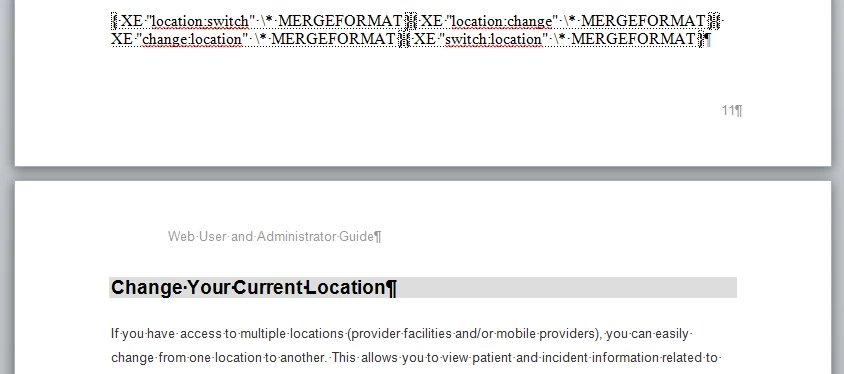
When I generate the print (Word) version of a Help system, the index entries appear before the topic heading rather than inline with the heading text. Here is an example:
index-wordexample.png

This causes two problems. First, extra space appears before the topic. Second, if a page break comes between the index entries and the topic heading, the index refers to the incorrect page.

A co-worker at a different office also generates a Word version of her product’s Help system and all of her index terms appear inline with the topic heading.

Obviously, I can fix this once I have converted to Word by moving the keywords into the heading. However, there must be a way of taking care of this on the RH side so that I don’t have to spend time correcting the Word version.

My co-worker and I have compared settings within RH, as well as how we add index terms to our topics. No answers there. In addition, I have looked at the Adobe Help, reviewed the Printed Documentation information in Peter Grainge’s site (excellent resource for RH!) and combed through this forum.

The only reference similar to this is item 2) in the following thread:

http://forums.adobe.com/message/3439104#3439104

This thread does not include a solution to this particular issue.

Can anyone help? Thanks in advance…

Ann

691
Translate
Report
Community guidelines
Be kind and respectful, give credit to the original source of content, and search for duplicates before posting. Learn more
community guidelines
Community Expert ,
Oct 03, 2013 Oct 03, 2013

Have you checked your Word settings? I suspect you have yours set to show fields.


See www.grainge.org for RoboHelp and Authoring tips

@petergrainge

Help others by clicking Correct Answer if the question is answered. Found the answer elsewhere? Share it here. "Upvote" is for useful posts.
Translate
Report
Community guidelines
Be kind and respectful, give credit to the original source of content, and search for duplicates before posting. Learn more
community guidelines
New Here ,
Oct 03, 2013 Oct 03, 2013

Thank you, Peter. But I believe my Word settings are fine. The Show field codes instead of their values option is not selected.

index-fieldsetting.png

Translate
Report
Community guidelines
Be kind and respectful, give credit to the original source of content, and search for duplicates before posting. Learn more
community guidelines
Community Expert ,
Oct 28, 2013 Oct 28, 2013

I'm sorry, I lost sight of this one. Have you resolved it? If not can you recreate it in a fresh one topic project that you could send me?


See www.grainge.org for RoboHelp and Authoring tips

@petergrainge

Help others by clicking Correct Answer if the question is answered. Found the answer elsewhere? Share it here. "Upvote" is for useful posts.
Translate
Report
Community guidelines
Be kind and respectful, give credit to the original source of content, and search for duplicates before posting. Learn more
community guidelines
New Here ,
Nov 20, 2013 Nov 20, 2013
LATEST

I found an answer.

We have a customized header file (.htt) that we applied to every topic, rather than applying it to the project when generating the layout. For other reasons, we now apply it only at the project level. In the Word version, the index terms now appear where we expect them--inline with the topic title.

Translate
Report
Community guidelines
Be kind and respectful, give credit to the original source of content, and search for duplicates before posting. Learn more
community guidelines
Resources
RoboHelp Documentation
Download Adobe RoboHelp