
Participant
February 7, 2012
Answered

Index Not Generating

  • February 7, 2012
  • 1 reply
  • 751 views

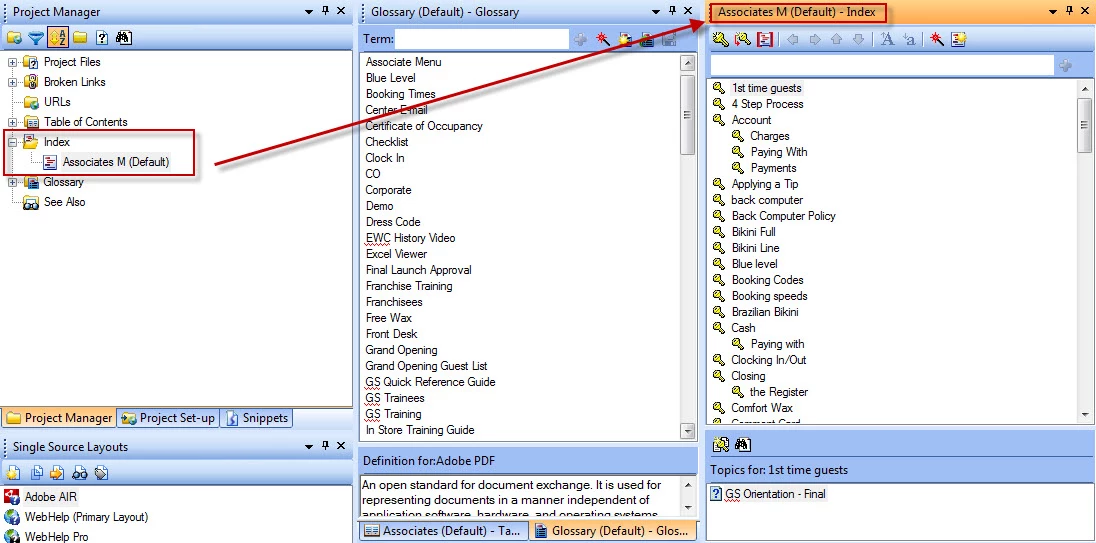
I have created a Master Project and one Child Project is linked to it. I'm having trouble viewing the index in the child project. I have uploaded it and saved and generated the child project by itself and within the master, and the index isn't appearing. I've created a glossary that works but the index does not. Can someone please help me with this? Thank you!

Image of index in the project manager of the child project:
This topic has been closed for replies.
Correct answer Peter Grainge

Go to Project Settings. Are the keywords in the HHK file or in topics? You must have at least one keyword in the HHK file.

If that is not it, create another index with just a couple of index words and generate using that. Any change?


See www.grainge.org for RoboHelp and Authoring tips

@petergrainge

1 reply

Peter Grainge
Community Expert
Community Expert
February 7, 2012

I suspect your merge is not set up correctly. Have you seen the pages on merging on my site? If not take a look there and download the ready made set up. Compare that with your set up.

Post back if still not resolved.


See www.grainge.org for RoboHelp and Authoring tips

@petergrainge

Use the menu (bottom right) to mark the Best Answer or Highlight particularly useful replies. Found the answer elsewhere? Share it here.
Participant
February 7, 2012

Thanks. I double checked the Merge and it matches. I have 2 other master projects and the indexes are visible there. This index isn't appearing in the child project when i save and generate it nor the master that it is merged with it.

Peter Grainge
Community Expert
Peter GraingeCommunity ExpertCorrect answer
Community Expert
February 7, 2012

Go to Project Settings. Are the keywords in the HHK file or in topics? You must have at least one keyword in the HHK file.

If that is not it, create another index with just a couple of index words and generate using that. Any change?


See www.grainge.org for RoboHelp and Authoring tips

@petergrainge

Use the menu (bottom right) to mark the Best Answer or Highlight particularly useful replies. Found the answer elsewhere? Share it here.