
Participant
September 2, 2009
Question

Index & Search won't work after compiling to Webhelp (RH x5.0.2)

  • September 2, 2009
  • 1 reply
  • 855 views

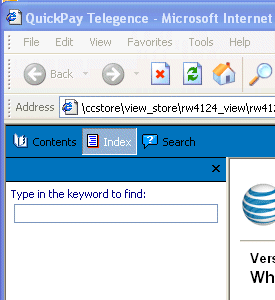
As I create the index, everything looks normal. When I view the compiled product (WebHelp) the Index and Search tabs are there, but when I click them, nothing happens. Nothing shows in the pane. When I put the cursor in the field, it just flickers, and whatever I type will not show in the search field. When I compile to MS HTML Help (.chm) both features work fine. I have a feeling something is corrupted, but I don't know which program-generated files are safe to delete. My browser is IE 6.0.2900. This behavior is the same whether it is on my computer in development mode, or loaded in the application I support.

The graphic pasted here is what I see when opening the product. Can anyone help me with this?
This topic has been closed for replies.

1 reply

Peter Grainge
Community Expert
Community Expert
September 3, 2009

Try generating to a new folder.

If that fails create a new layout, not a duplicate.

Otherwise I thought this was covered recently so try a search if this doesn't help.

Let us know how that goes.


See www.grainge.org for RoboHelp and Authoring tips

Use the menu (bottom right) to mark the Best Answer or Highlight particularly useful replies. Found the answer elsewhere? Share it here.
BeckyJWAuthor
Participant
September 10, 2009

I tried both of your suggestions and neither worked. I just created a new project and imported the .htm's and it works fine now.

Becky Williams

Instructional Design, IT Systems Training | AT&T Services | 1125 E Campbell Rd | Richardson, TX 75080 | O: 972.952.8638 | M: 972.989.9155 | RW4124@att.com

(This message, including any attachments, is the property of and contains confidential information of AT&T Mobility. If you are not the intended recipient, please notify the sender of the error and delete this message and any attachments.)

Peter Grainge
Community Expert
Community Expert
September 11, 2009

Obviously something got corrupted but you're OK now.

Take a look at Before You Post re including your email address. Let me know if you want it removed.


See www.grainge.org for RoboHelp and Authoring tips

Use the menu (bottom right) to mark the Best Answer or Highlight particularly useful replies. Found the answer elsewhere? Share it here.