
Exit
  • Global community
    • Language:
      • Deutsch
      • English
      • Español
      • Français
      • Português
  • 日本語コミュニティ
  • 한국 커뮤니티
0

Indigo layout index has keywords and subkeywords at same level

New Here ,
Aug 07, 2017 Aug 07, 2017

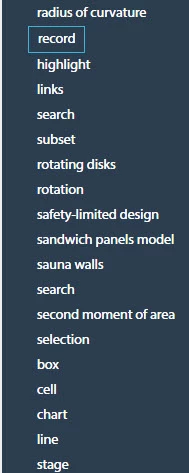
I'm using the Indigo HTML 5 layout in RH2017. The index in my help project contains keywords and subkeywords. However, the subkeywords are listed at the same level as the keyword. This causes the index to look like it's in non-alphabetical order, because it's not clear to the user which are keywords or subkeywords.

Here is a screenshot with the Indigo layout:
2017-08-07_11-03-58_Indigo.jpg

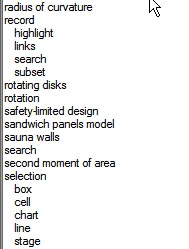
And here is the same index in a CHM output. The subkeywords are at a different level.
2017-08-07_11-04-19_CHM.jpg

Is there a way to reproduce the CHM-style nesting of the index with the Indigo layout?

3.7K
Translate
Report
Community guidelines
Be kind and respectful, give credit to the original source of content, and search for duplicates before posting. Learn more
community guidelines

correct answers 1 Correct answer

Adobe Employee , Aug 08, 2017 Aug 08, 2017

Hi stewic, thanks for filing the issue.

This issue is there in RH 2017 Update 1, we are working on it and update 2 shall be out soon later this month.

Thanks,

Vivek

Translate
Community Expert ,
Aug 07, 2017 Aug 07, 2017

Please see the thread at How to control fomatting used on WebHelp Index tab?

I will lock this thread to keep all the answers in one thread. Post there if what is there does not help.


See www.grainge.org for RoboHelp and Authoring information

@petergrainge

Help others by clicking Correct Answer if the question is answered. Found the answer elsewhere? Share it here. "Upvote" is for useful posts.
Translate
Report
Community guidelines
Be kind and respectful, give credit to the original source of content, and search for duplicates before posting. Learn more
community guidelines
Community Expert ,
Aug 07, 2017 Aug 07, 2017

I have unlocked this thread as there is a key difference, you are generating an HTML5 layout and the other thread is about WebHelp.

Nonetheless, check the other thread first. Also try importing the Indigo layout again and giving it a different name such as Indigo 2.

Post back to say solved or report that it is still an issue.


See www.grainge.org for RoboHelp and Authoring information

@petergrainge

Help others by clicking Correct Answer if the question is answered. Found the answer elsewhere? Share it here. "Upvote" is for useful posts.
Translate
Report
Community guidelines
Be kind and respectful, give credit to the original source of content, and search for duplicates before posting. Learn more
community guidelines
New Here ,
Aug 07, 2017 Aug 07, 2017

I'm still having this issue. I've tried re-importing the layout, but no success. I'm seeing the issue when I use the Indigo layout with other RH projects too.

I can produce (non-HTML5) Webhelp that has the correct index indentation level.

Translate
Report
Community guidelines
Be kind and respectful, give credit to the original source of content, and search for duplicates before posting. Learn more
community guidelines
Community Expert ,
Aug 07, 2017 Aug 07, 2017

Have you explored the correct answer in the other thread? Because this problem is only affecting some users, it is the most likely solution.

Do you have another machine that is not used for RoboHelp where you could install the trial version and Service Release 4 to see what happens then?


See www.grainge.org for RoboHelp and Authoring information

@petergrainge

Help others by clicking Correct Answer if the question is answered. Found the answer elsewhere? Share it here. "Upvote" is for useful posts.
Translate
Report
Community guidelines
Be kind and respectful, give credit to the original source of content, and search for duplicates before posting. Learn more
community guidelines
New Here ,
Aug 07, 2017 Aug 07, 2017

I've just installed the trial version on a new machine, updated Robohelp to update 1, and tested it with a sample project and Indigo layout, and I still see this issue.

Translate
Report
Community guidelines
Be kind and respectful, give credit to the original source of content, and search for duplicates before posting. Learn more
community guidelines
Community Expert ,
Aug 07, 2017 Aug 07, 2017

Before I see if I can get any more information, what is your operating system and can you confirm RoboHelp is being installed with admin rights?

Also please test with Azure Blue layout and webhelp.

It will help to know what, if anything, works OK.


See www.grainge.org for RoboHelp and Authoring information

@petergrainge

Help others by clicking Correct Answer if the question is answered. Found the answer elsewhere? Share it here. "Upvote" is for useful posts.
Translate
Report
Community guidelines
Be kind and respectful, give credit to the original source of content, and search for duplicates before posting. Learn more
community guidelines
Community Expert ,
Aug 07, 2017 Aug 07, 2017

Also please confirm you are generating to the same drive that the project is on.


See www.grainge.org for RoboHelp and Authoring information

@petergrainge

Help others by clicking Correct Answer if the question is answered. Found the answer elsewhere? Share it here. "Upvote" is for useful posts.
Translate
Report
Community guidelines
Be kind and respectful, give credit to the original source of content, and search for duplicates before posting. Learn more
community guidelines
New Here ,
Aug 07, 2017 Aug 07, 2017

I'm using Windows 10. Robohelp is installed as admin on the C drive, which is also where I'm running the project and generating the output. Azure Blue (HTML5) and normal Webhelp both work OK.

Translate
Report
Community guidelines
Be kind and respectful, give credit to the original source of content, and search for duplicates before posting. Learn more
community guidelines
Community Expert ,
Aug 07, 2017 Aug 07, 2017

I just tested again and am seeing the same thing. I will report it as a bug and post the link here for you and others to vote for.


See www.grainge.org for RoboHelp and Authoring information

@petergrainge

Help others by clicking Correct Answer if the question is answered. Found the answer elsewhere? Share it here. "Upvote" is for useful posts.
Translate
Report
Community guidelines
Be kind and respectful, give credit to the original source of content, and search for duplicates before posting. Learn more
community guidelines
Community Expert ,
Aug 07, 2017 Aug 07, 2017

Please click the link below and add your vote if you find this problem.

Tracker


See www.grainge.org for RoboHelp and Authoring information

@petergrainge

Help others by clicking Correct Answer if the question is answered. Found the answer elsewhere? Share it here. "Upvote" is for useful posts.
Translate
Report
Community guidelines
Be kind and respectful, give credit to the original source of content, and search for duplicates before posting. Learn more
community guidelines
Adobe Employee ,
Aug 08, 2017 Aug 08, 2017

Hi stewic, thanks for filing the issue.

This issue is there in RH 2017 Update 1, we are working on it and update 2 shall be out soon later this month.

Thanks,

Vivek

Translate
Report
Community guidelines
Be kind and respectful, give credit to the original source of content, and search for duplicates before posting. Learn more
community guidelines
New Here ,
Sep 13, 2017 Sep 13, 2017

Hi Stewic,

Did the update 2 for RoboHelp 2017 fix the problem for you? I just installed the update and regenerated...my index is still not indenting for the Indigo layout.

Translate
Report
Community guidelines
Be kind and respectful, give credit to the original source of content, and search for duplicates before posting. Learn more
community guidelines
Community Expert ,
Sep 13, 2017 Sep 13, 2017

You have to import the layout again. It does not correct things in your

existing layout.

Help others by clicking Correct Answer if the question is answered. Found the answer elsewhere? Share it here. "Upvote" is for useful posts.
Translate
Report
Community guidelines
Be kind and respectful, give credit to the original source of content, and search for duplicates before posting. Learn more
community guidelines
New Here ,
Sep 13, 2017 Sep 13, 2017

I'm sorry Peter, I'm not following when you say "you have to import the layout again." I tried creating a new HTML5 Indigo layout but that didn't do the trick.

Translate
Report
Community guidelines
Be kind and respectful, give credit to the original source of content, and search for duplicates before posting. Learn more
community guidelines
LEGEND ,
Sep 13, 2017 Sep 13, 2017

Hi there

Of course I'm not Peter but it's rather late where he lives, so here goes.

See if the video shown below helps you do that.

Presently still uploading but shouldn't be too much longer.

Translate
Report
Community guidelines
Be kind and respectful, give credit to the original source of content, and search for duplicates before posting. Learn more
community guidelines
Community Expert ,
Sep 13, 2017 Sep 13, 2017

Create a new simple project with just enough to test this.

If that works then delete any Indigo layout from your main project, close

it, delete the CPD and then reopen it. Now create a new Indigo layout.

It's late here. I'll post more in the morning.

Help others by clicking Correct Answer if the question is answered. Found the answer elsewhere? Share it here. "Upvote" is for useful posts.
Translate
Report
Community guidelines
Be kind and respectful, give credit to the original source of content, and search for duplicates before posting. Learn more
community guidelines
Community Expert ,
Sep 14, 2017 Sep 14, 2017

Hold up. From the wording of your reply, I thought you had seen Update 2 released. It is fixed in the update as I saw an early version for testing. When Update 2 is released, then import the layout afresh.


See www.grainge.org for RoboHelp and Authoring information

@petergrainge

Help others by clicking Correct Answer if the question is answered. Found the answer elsewhere? Share it here. "Upvote" is for useful posts.
Translate
Report
Community guidelines
Be kind and respectful, give credit to the original source of content, and search for duplicates before posting. Learn more
community guidelines
Community Expert ,
Sep 14, 2017 Sep 14, 2017

I'm now seeing it available. Any joy now?


See www.grainge.org for RoboHelp and Authoring information

@petergrainge

Help others by clicking Correct Answer if the question is answered. Found the answer elsewhere? Share it here. "Upvote" is for useful posts.
Translate
Report
Community guidelines
Be kind and respectful, give credit to the original source of content, and search for duplicates before posting. Learn more
community guidelines
New Here ,
Sep 14, 2017 Sep 14, 2017

Hi, yes I got this to work in RH2017 Update 2. You need to re-import the Indigo layout for this to work.

In the Output Setup pod, click Create New Responsive Layout. Select Indigo from the list, give it a different name (like Indigo_new), and select this new layout when you generate your output.

Translate
Report
Community guidelines
Be kind and respectful, give credit to the original source of content, and search for duplicates before posting. Learn more
community guidelines
New Here ,
Sep 14, 2017 Sep 14, 2017
LATEST

Thank you for your response! Captiv8r​'s video essentially showed what you described so I was able to fix it yesterday

Translate
Report
Community guidelines
Be kind and respectful, give credit to the original source of content, and search for duplicates before posting. Learn more
community guidelines
Resources
RoboHelp Documentation
Download Adobe RoboHelp