
Inspiring
January 25, 2013
Answered

Is there a way to set up browse sequences for project with multiple TOCs and conditionalized modules

  • January 25, 2013
  • 1 reply
  • 1605 views

I'm using RoboHelp 9 with WebHelp output.

I've got five outputs, one of which contains Help for common functions, while the other four contain Help for licensed modules. When a user opens the Help for a licensed module, the user sees the core Help and the licensed Help. In addition, files are conditionalized so that searching for unlicensed content from a licensed Help module brings up nothing.

I've been troubleshooting problems with the Previous Topic and Next Topic which, thanks to William, I learned are related to browse sequences. After trying assorted configurations, I've got a couple of questions:

  • Does RH support only a single browse sequence in a project, even when the project has multiple outputs & TOCs?
  • If RH supports only a single browse sequence, does that mean there is no way to create a unique browse sequence for each separate output?
  • If RH supports multiple browse sequences, what is the workflow?

I also maintain a 'master' TOC that contains all the modules, both common and unlicensed. What I've done for now is to autocreate a browse sequence based on the 'master TOC'. When I generate output for a licensed module, which is conditionalized, I only see the TOC for that module and, therefore, can only browse between books and subbooks in that module. I've also verified that topics that do not appear in the conditionalized module, such as for another licensed module, do not appear in the Search results list either.

Carol
This topic has been closed for replies.
Correct answer johndaigle

Hang on, Carol

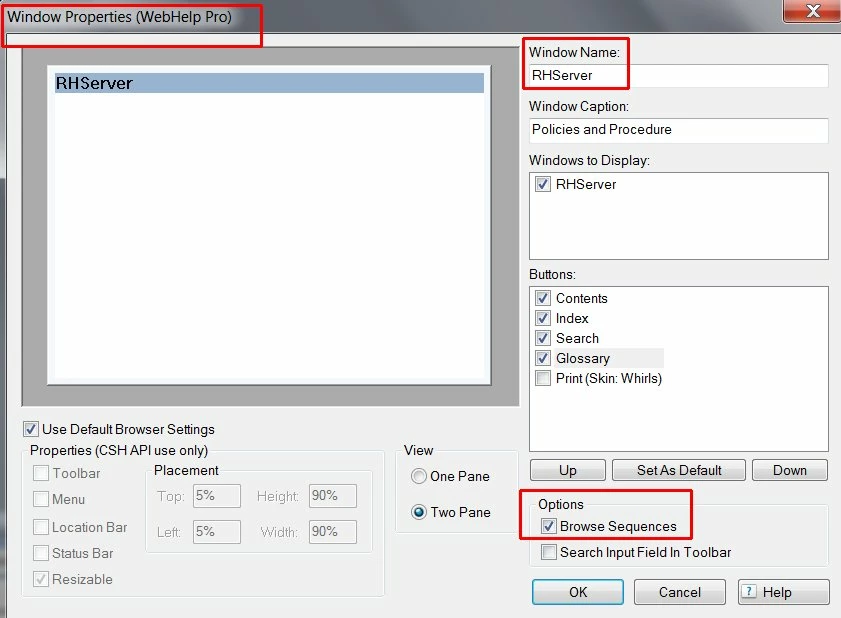
Actually Browse Sequences *are* supported in WebHelp Pro on RoboHelp Server 9. (What Colum might have meant is that you cannot select or deselect different sequences, as you can plain WebHelp). To enable them correctly, you should create a custom window (give it a unique Window name) after making WebHelp Pro your primary layout (Project Setup Pod > Windows). Then make sure the "Browse Sequence" option is ticked.

Then, when you generate the Single Source Layout, use the WebHelp Pro Options to select the Default Window you have created. You will note that unlike the plain WebHelp SSL options, there is no place to select specific browse sequences, so by default your sequence will be defined by whatever you custom-crafted in the Browse Sequence Editor. 

I tested using the Employee Care Sample in RoboHelp Server 9 and it worked just fine.

Thanks

John Daigle

Adobe Certified RoboHelp and Captivate Instructor

Evergreen, Colorado

www.showmethedemo.com


Me again, Carol

You also asked about the functional differences between WebHelp and WebHelp Pro, so let me elaborate.

I'm aware of only two major differences (other than the extra benefits of feedback analytics reports and management of "Areas" with authentication in RoboHelp Server).

  1. The behavior of Browse Sequences as explained above
  2. The fact that Content Categories are not supported in WebHelp Pro for this latest version 9.

As for the Browse Sequences you are trying to provide for different modules (licensed, etc.): Multiple Browse Sequences are included in a single .BRS file. The sequences are defined in the XML within the single file.

As a workaround (for either WebHelp or WebHelp Pro) you could create a NGP Help.brs. which you have already created for one module; then backup and archive it. Then, create a modification for the different module before you generate again. The NGP Help.brs. will need to have the same name as your project so you will have to manage the desired .brs file into the project folder when you generate that version. All of your other choices (TOC, Index, Conditional Tags, etc.) would remain the same for the respective modules.

Finally, I note that you are apparently generating WebHelp Pro right now even though you are not publishing it to the RH Server? This is really not the best practice. You should generate plain WebHelp for a web server that does not have RH Server on it (even though you may be getting away with it). As for your concern about "breaking" something; each output is placed in a different !SSL! folder automatically when you generate, so you should be able to generate WebHelp without interferring with the WebHelp Pro output. Then, you can re-publish to the RH Server using WebHelp Pro whenever the server is ready.

John Daigle

Adobe Certified RoboHelp and Captivate Instructor

Evergreen, Colorado

www.showmethedemo.com

1 reply

RoboColum_n_
Legend
January 26, 2013

Hi Carol.

A project can have many browse sequences. They are added in the same way as just one - via the Tools > Browse Sequence Editor menu item. However they can not be excluded from the output by adding a tag. Instead if a browse sequence contains a topic from both the common and licensed help, I'd expect a licensed help user not to see the common help topic in the sequence.

You'd need to test this though. I haven't used browse sequences since my CHM file days and they work slightly differently than in WebHelp.

Peter Grainge
Community Expert
Community Expert
January 28, 2013

When you generate WebHelp, you can select which Browse Sequences are activated. Just don't select two that have a common topic as that confuses the hell out of Rh.

At one time, Rh would not let you do that but the restriction had to be removed to allow Content Categories.


See www.grainge.org for RoboHelp and Authoring tips

@petergrainge

Use the menu (bottom right) to mark the Best Answer or Highlight particularly useful replies. Found the answer elsewhere? Share it here.
Inspiring
January 28, 2013

I'm not sure whether WebHelp and WebHelp Pro handle browse sequences differently. However, in WebHelp Pro I don't see any option for selecting different browse sequences in the Single Source Layouts > WebHelp Pro Options dialog box (Under Content, I see TOC, Index, Glossary, Variables, Language, Encoding, Default Topic, Default Window).

I created a Browse Sequence Editor for all topics. To do this, I selected the default TOC, which includes common and licensed topics, and used Auto-create using TOC. The name of the BRS is "NGP Help.brs" and it is stored at the root of the Help project.

I then tried to create four browse sequences. To do this, I navigated to the folder containing the topics for each licensed module and selected its TOC when creating the browse sequence. RH never creates another BRS. It just keeps updating NGP Help.brs.

So what I've got now is a single browse sequence that includes all the Help content, both common and licensed.

  • In a licensed Help module, the browse sequence takes the user from book to book or topic to topic, even if a book or topic is not in the TOC.
  • The good news is that the browse sequence in licensed module A does not take the user to a topic in licensed module B, not does it find topics in licensed module B (via Search).

Kindly let me know if I'm missing something obvious in WebHelp Pro that would enable me to create a separate browse sequence for each licensed module.

Thank you.