
Legend
April 22, 2014
Question

Issues with importing FM Glossary into RH

  • April 22, 2014
  • 1 reply
  • 678 views

Hi

I have created the Glossary in FM using the following procedure:

1,  Select the text for Glossary term and assign the Glossary marker to it.

2.  In the Marker window, add a colon next to the term (as a separator) and enter the description.
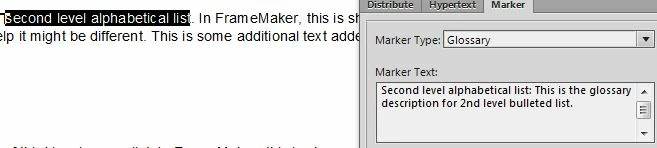
3.  Click New Marker.

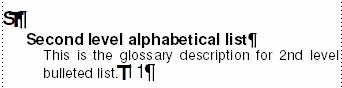
When I generate the Glossary in FM, I get it right.
However, when I import this to RH, the entire text in the Marker window is considered as the Glossary term and the paragraph which has the selected text comes out as the Glossary description.
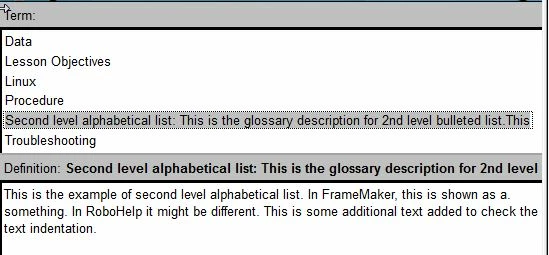
Where am I going wrong? Please advise.

Sreekanth

This topic has been closed for replies.

1 reply

Jeff_Coatsworth
Community Expert
Community Expert
April 22, 2014

I think you’ve a space after your colon in the marker text – that might be throwing it off

Legend
April 22, 2014

I removed the space. Still no use.

Sreekanth

Legend
April 22, 2014

What version of TCS are you doing this in?

See if this thread helps - http://forums.adobe.com/message/1043852#1043852


I am using TCS4.

Even the GLO file is showing incorrect format.

<glossentry>

                    <glossterm>Second level alphabetical list:This is the glossary description for 2nd level bulleted list.This</glossterm>

                    <glossdef>This is the example of second level alphabetical list. In FrameMaker, this is shown as a. something. In RoboHelp it might be different. This is some additional text added to check the text indentation.</glossdef>

          </glossentry>

Sreekanth