
Legend
April 22, 2014
Question

Issues with importing FM Glossary into RH

  • April 22, 2014
  • 1 reply
  • 678 views

Hi

I have created the Glossary in FM using the following procedure:

1,  Select the text for Glossary term and assign the Glossary marker to it.

2.  In the Marker window, add a colon next to the term (as a separator) and enter the description.
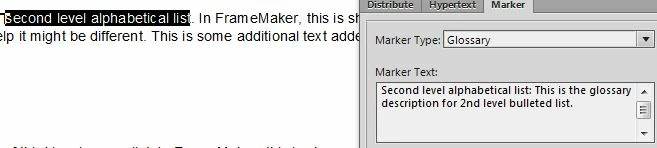
3.  Click New Marker.

When I generate the Glossary in FM, I get it right.
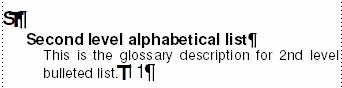
However, when I import this to RH, the entire text in the Marker window is considered as the Glossary term and the paragraph which has the selected text comes out as the Glossary description.
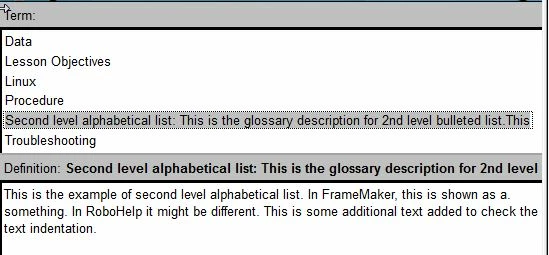
Where am I going wrong? Please advise.

Sreekanth

This topic has been closed for replies.

1 reply

Jeff_Coatsworth
Community Expert
Community Expert
April 22, 2014

I think you’ve a space after your colon in the marker text – that might be throwing it off

Legend
April 22, 2014

I removed the space. Still no use.

Sreekanth

Jeff_Coatsworth
Community Expert
Community Expert
September 3, 2014

@max_drawdown: The issue is not resolved. We decided to drop that feature then. However, now that you reminded me I have logged a bug report with Adobe. I will keep you posted on any update I receive.

@Jeff_Coatsworth: I guess I took the wrong term here as an example. The glossary and the Index are at first level only. No issues with the Index though.

Sreekanth


So have you ever tried bringing over a multi-level index entry? It never worked for me because of a fatal crash that FM would throw if you used the “book of books” concept with an entry like Animals:Canada:Beaver